一、常用的线程池
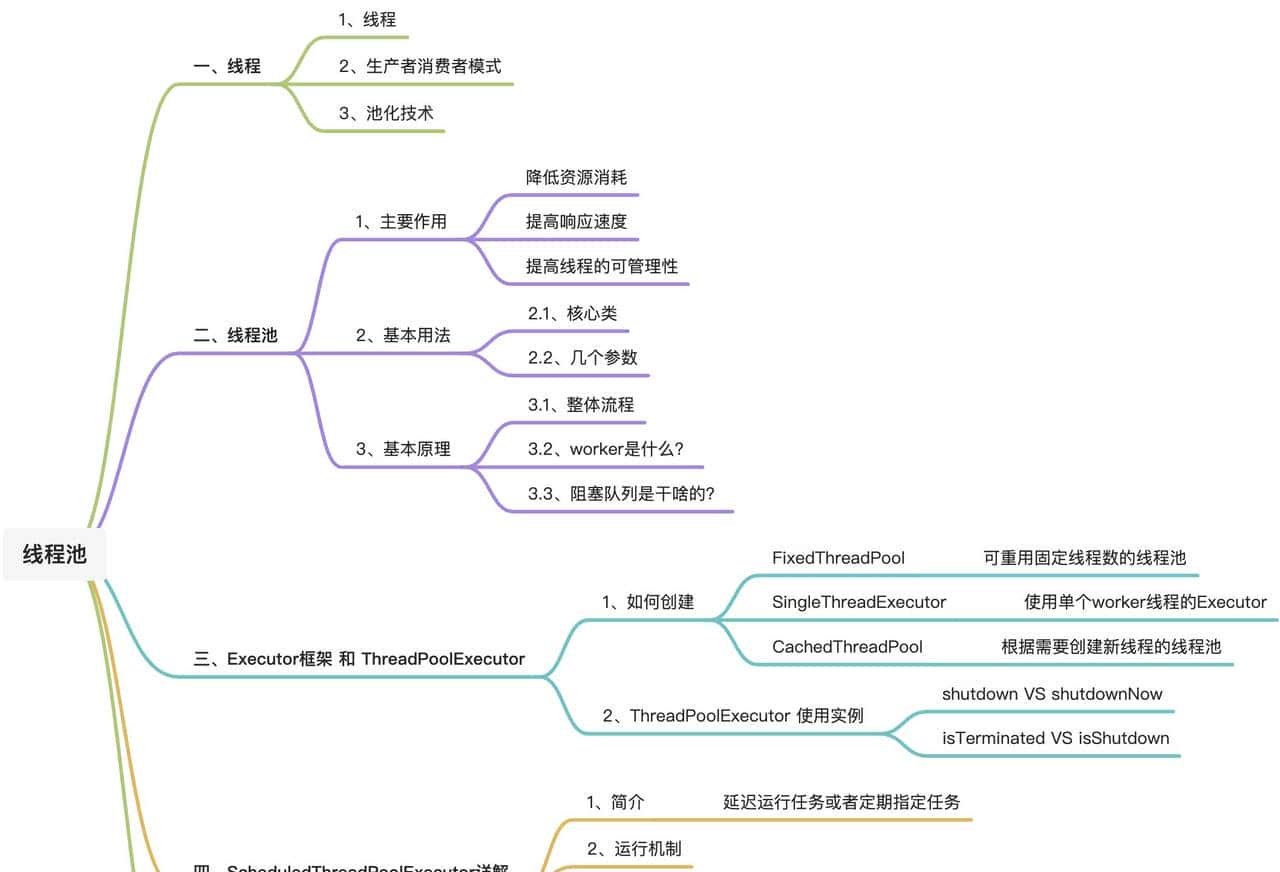
Executor 和 ThreadPoolExecutor
Executor: 一个Java中定义的接口,定义该接口可以执行一个runnable的command
public interface Executor {

    /**
     * Executes the given command at some time in the future.  The command
     * may execute in a new thread, in a pooled thread, or in the calling
     * thread, at the discretion of the {@code Executor} implementation.
     *
     * @param command the runnable task
     * @throws RejectedExecutionException if this task cannot be
     * accepted for execution
     * @throws NullPointerException if command is null
     */
    void execute(Runnable command);
}
ThreadPoolExecutor: Executor、ExecutorService的实现了类,定义了一个组线程,可以并发的指定多个任务
public class ThreadPoolExecutor extends AbstractExecutorService {
}
public abstract class AbstractExecutorService implements ExecutorService {
}
public interface ExecutorService extends Executor {
// 执行shutdown终止线程池
// shutdown: 将线程池状态设置为SHUTDOWN, 正在进行中的任务将继续执行, 不在接受新的任务
// shutdownNow: 立即结束线程池运行, 状态设置为 STOP
void shutdown();
List<Runnable> shutdownNow();
// 结束检测
boolean isShutdown();
boolean isTerminated();
// 提交任务
Future<?> submit(Runnable task);
// 注意有返回值
<T> Future<T> submit(Callable<T> task);
}
两个检测方法的区别:
isShutdown()
触发条件:调用shutdown()或shutdownNow()方法后立即返回true。
作用:表示线程池已进入关闭流程,不再接受新任务,但已提交的任务仍会继续执行。
isTerminated()
触发条件:调用shutdown()后,所有已提交任务执行完毕;或调用shutdownNow()后成功中断所有任务。
作用:表示线程池已完全关闭,所有任务完成,线程池资源释放
自己实现一个线程池
package com.xlg.component.video.thread;

import com.google.common.util.concurrent.ThreadFactoryBuilder;
import lombok.extern.slf4j.Slf4j;
import org.junit.Test;

import java.util.concurrent.*;

/**
 * ps: 线程池测试类
 * @author qingguox
 * Created on 2025-11-25
 */
@Slf4j
public class ThreadPoolTest {

    @Test
    public void test_executor() {
        // executor
        Executor executor = Executors.newFixedThreadPool(10);

        // threadPoolExecutor
        int corePoolSize = 2;
        int maximumPoolSize = 3;
        TimeUnit unit = TimeUnit.SECONDS;
        long keepAliveTime = 30; // 空闲线程存活时间
        BlockingQueue<Runnable> workQueue = new LinkedBlockingQueue<Runnable>(1);

        ThreadFactory factory = new ThreadFactoryBuilder().setNameFormat("custom-thread-pool-%d").build();
        Executor poolExecutor = new ThreadPoolExecutor(corePoolSize, maximumPoolSize, keepAliveTime, unit,
                workQueue, factory, new ThreadPoolExecutor.AbortPolicy()
        );

        Runnable task1 = new Runnable() {
            @Override
            public void run() {
                log.info("task1 run...!");
            }
        };
        Runnable task2 = new Runnable() {
            @Override
            public void run() {
                log.info("task2 run...!");
            }
        };

        Runnable task3 = new Runnable() {
            @Override
            public void run() {
                log.info("task3 run...!");
            }
        };

        Runnable task4 = new Runnable() {
            @Override
            public void run() {
                log.info("task4 run...!");
            }
        };

        poolExecutor.execute(task1);
        poolExecutor.execute(task2);
        poolExecutor.execute(task3);
        poolExecutor.execute(task4);

        // 此时线程池有几个线程呢?
        // 答案是3个
        // 2个核心线程处理task1,task2 队列中存在task3 一个非核心线程处理task4
        ThreadPoolExecutor threadPoolExecutor = (ThreadPoolExecutor)poolExecutor;
        int poolSize = threadPoolExecutor.getPoolSize();
        int corePoolSize1 = threadPoolExecutor.getCorePoolSize();
        BlockingQueue<Runnable> queue = threadPoolExecutor.getQueue();
        int queueSize = queue.size();
        log.info("corePoolSize1:{}, poolSize:{}, queueSize:{}", corePoolSize1, poolSize, queueSize);
    }


}
框架定义线程池
在Java中,
<font>Executors</font>
<font>ExecutorService</font>
<font>Executors</font>
1. FixedThreadPool
创建方式:
ExecutorService executor = Executors.newFixedThreadPool(nThreads);
这里
<font>nThreads</font>
优点:
适用于负载比较均衡的场景,可以控制并发的线程数。减少了频繁创建和销毁线程的开销。
缺点:
如果任务队列满了,再提交任务时会抛出
<font>RejectedExecutionException</font>
2. CachedThreadPool
创建方式:
ExecutorService executor = Executors.newCachedThreadPool();
优点:
它可以适应任意数量的并发任务,并且可以动态地调整线程数量。适用于执行大量短期异步任务的场景。
缺点:
如果有大量任务同时提交,将会创建大量线程,可能导致系统资源耗尽。长时间闲置的线程会被终止并从池中移除,这可能导致频繁的线程创建和销毁。
3. SingleThreadExecutor
创建方式:
ExecutorService executor = Executors.newSingleThreadExecutor();
优点:
适用于那些需要顺序或定期执行任务的场景。减少了多线程环境中的复杂性和错误率。
缺点:
单个线程处理所有任务,如果有大量任务同时提交,可能会造成性能瓶颈。如果单个任务执行时间较长,将阻塞后续任务的执行。
4. ScheduledThreadPool
创建方式:
ScheduledExecutorService executor = Executors.newScheduledThreadPool(nThreads);
这里
<font>nThreads</font>
优点:
适用于需要延迟执行或定期执行任务的场景。可以使用
<font>schedule</font>
<font>scheduleAtFixedRate</font>
缺点:
如果所有线程都在忙碌,新提交的任务将在队列中等待,可能导致资源浪费。需要合理设置线程数量,过多的线程可能导致资源过度消耗。
总结与选择建议:
FixedThreadPool 适合负载均衡的场景,但要注意任务队列的处理。CachedThreadPool 适合处理大量短期异步任务,但要小心资源耗尽问题。SingleThreadExecutor 适合顺序或定期执行任务的场景,但要注意单个任务执行时间过长的问题。ScheduledThreadPool 适合需要定时任务的场景,但要合理配置线程数以避免资源浪费。
注意:
大厂阿里巴巴最佳时间手册中 却不建议大家使用这几个线程池,大家有知道为什么吗?
答案就是:因为这些线程池需要根据场景来使用的,需要足够了解内部的实现原理,具备很多线程池使用经验后斟酌使用,在生产环境一般都是业务自定义线程池,而不是直接使用框架给予的这几个线程池。
选择哪种类型的线程池取决于具体的应用场景和需求。在实际应用中,通常需要根据任务的性质、预期的并发水平以及系统的资源情况来选择最合适的线程池类型。在某些情况下,也可以考虑自定义线程池配置以获得最佳性能。例如,使用
<font>ThreadPoolExecutor</font>
二、线程池的实际应用
案例: 快手短视频发布后,KafkaConsumer 单实例中并发消费多个视频发布消息
@Test
public void test_photo_upload_consumer() {
    // 生产批量视频上传信号, 然后消费后插入数据库
    List<PhotoUploadMsg> photoUploadMsgList = new ArrayList<>();
    int size = 1000;
    for (int i = 0; i < size; i++) {
        PhotoUploadMsg ms1 = new PhotoUploadMsg();
        ms1.setPhotoId(i + 1111L);
        ms1.setPhotoUrl("http://www.baidu.com");
        ms1.setPhotoTitle("视频Title: " + ms1.getPhotoId());
        photoUploadMsgList.add(ms1);
    }

    // 消费逻辑
    ExecutorService executorService = ThreadExecutorHolder.getIndicatorProcessExecutor();
    List<Future<Boolean>> futures = new ArrayList<>();
    photoUploadMsgList.forEach(msg -> {
        Future<Boolean> submit = executorService.submit(new Callable<Boolean>() {
            @Override
            public Boolean call() throws Exception {
                log.info("insert DB msg:{}", JacksonUtils.toJSON(msg));
                return true;
            }
        });
        futures.add(submit);
    });

    List<Boolean> successList = new ArrayList<>();
    futures.forEach(task -> {
        try {
            successList.add(task.get(TIME_OUT, TIME_UNIT));
        } catch (Exception e) {
            log.error(e.getMessage(), e);
        }
    });
    log.info("successListSize:{}", successList.size());
}
结束!!
© 版权声明
文章版权归作者所有,未经允许请勿转载。
相关文章


暂无评论...