20220415_二维码生成器学习笔记
1概述
一般大家使用这种功能都是为了实现业务,例如常见的扫描二维码跳转链接(页面),扫描二维码出现文字等等。有些二维码中间还带有 Logo 这种图片,将需要嵌入二维码的图片路径准备好就没有问题。
本文基于google的zxing依赖包,进行二维码生成展示的代码示例学习。
效果演示:
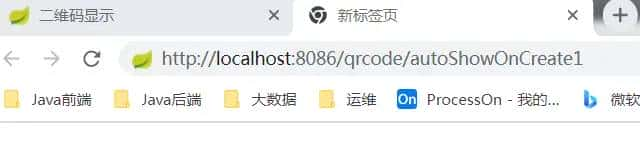
浏览器输入如下地址,回车,
http://localhost:8086/qrcode/autoShowOnCreate1
手机扫描,则自动跳入百度页面,点击显示二维码按钮,则显示内容。
1.1二维码原理
1.1.1线性堆叠式二维码
1.1.2矩阵式二维码(最为常用的类型)
在一个矩形空间通过黑、白像素在矩阵中的不同分布进行编码。
1.1.3邮政码
1.2生成二维码方法
-
借助第三方jar
如:zxing和qrcodejar
zxing:是一个开源的、多格式的一维/二维条码图像处理库,用 Java 实现,可移植到其他语言。
-
Javascript
如jquery.qrcode.js
2代码示例
2.1maven依赖
<?xml version="1.0" encoding="UTF-8"?>

<project xmlns="http://maven.apache.org/POM/4.0.0" xmlns:xsi="http://www.w3.org/2001/XMLSchema-instance"
         xsi:schemaLocation="http://maven.apache.org/POM/4.0.0 http://maven.apache.org/xsd/maven-4.0.0.xsd">

    <!--设置继承的父模块-->
    <parent>
        <artifactId>C200myqrcodedemo</artifactId>
        <groupId>com.kikop</groupId>
        <version>0.0.1-SNAPSHOT</version>
        <relativePath>../pom.xml</relativePath>
    </parent>

    <modelVersion>4.0.0</modelVersion>

    <artifactId>myzxingemo</artifactId>

    <name>${project.artifactId}</name>
    <description>quickstart project</description>
    <!-- FIXME change it to the project s website -->
    <url>http://www.example.com</url>

    <properties>
        <project.build.sourceEncoding>UTF-8</project.build.sourceEncoding>
        <maven.compiler.source>1.8</maven.compiler.source>
        <maven.compiler.target>1.8</maven.compiler.target>
    </properties>

    <dependencies>


        <dependency>
            <groupId>org.springframework.boot</groupId>
            <artifactId>spring-boot-starter-web</artifactId>
        </dependency>

        <dependency>
            <groupId>org.springframework.boot</groupId>
            <artifactId>spring-boot-starter-test</artifactId>
            <scope>test</scope>
        </dependency>


        <dependency>
            <groupId>org.springframework.boot</groupId>
            <artifactId>spring-boot-devtools</artifactId>
            <!--optional:两个项目直接不依赖传递-->
            <optional>true</optional>
        </dependency>


        <dependency>
            <groupId>org.springframework.boot</groupId>
            <artifactId>spring-boot-starter-thymeleaf</artifactId>
        </dependency>


        <!--4.fastjson-->
        <!-- https://mvnrepository.com/artifact/com.alibaba/fastjson -->
        <dependency>
            <groupId>com.alibaba</groupId>
            <artifactId>fastjson</artifactId>
            <version>${fastjson.version}</version>
        </dependency>

        <!--5.google二维码生成依赖包-->
        <dependency>
            <groupId>com.google.zxing</groupId>
            <artifactId>core</artifactId>
            <version>3.4.1</version>
        </dependency>

        <dependency>
            <groupId>com.google.zxing</groupId>
            <artifactId>javase</artifactId>
            <version>3.4.1</version>
        </dependency>

    </dependencies>


</project>
2.2后台编写
2.2.1MyQrCodeUtils
package com.kikop.utils;

import com.google.zxing.*;
import com.google.zxing.client.j2se.BufferedImageLuminanceSource;
import com.google.zxing.common.BitMatrix;
import com.google.zxing.common.HybridBinarizer;
import com.google.zxing.qrcode.decoder.ErrorCorrectionLevel;
import com.kikop.myconst.ConstVarManager;

import javax.imageio.ImageIO;
import java.awt.*;
import java.awt.geom.RoundRectangle2D;
import java.awt.image.BufferedImage;
import java.io.File;
import java.io.OutputStream;
import java.util.Hashtable;

/**
 * @author kikop
 * @version 1.0
 * @project myzxingdemo
 * @file MyQrCodeUtils
 * @desc 二封装维码生成工具类
 * @date 2022/04/16
 * @time 20:39
 * @by IDE: IntelliJ IDEA
 */
public class MyQrCodeUtils {

    private static final String CHARSET = "utf-8";

    public static final String FORMAT_NAME = "jpeg";

    // 二维码尺寸
    private static final int QRCODE_SIZE = 300;

    // LOGO图片宽度,原始图片大于会出错
    private static final int WIDTH = 60;
    // LOGO图片高度
    private static final int HEIGHT = 60;

    /**
     * 生成二维码
     *
     * @param content                                            存放在二维码中的内容,二维码中的内容可以是文字,可以是链接等
     * @param logoImgPath(C:Userskikopmyuploadfile	iger.jpg)
     * @param destPath                                           生成的二维码存放路径(C:Userskikopmyuploadfile1.jpg)
     * @param needCompress                                       是否需要压缩
     * @throws Exception
     */
    public static void create(String content, String logoImgPath, String destPath, boolean needCompress) throws Exception {

        BufferedImage image = createImage(content, logoImgPath, needCompress);
        mkdirs(destPath);
        ImageIO.write(image, FORMAT_NAME, new File(destPath));
    }

    /**
     * 获取二维码内容
     *
     * @param path
     * @return
     * @throws Exception
     */
    public static String decodeContent(String path) throws Exception {
        return decode(new File(path));
    }


    private static void encode(String content, String imgPath, OutputStream output, boolean needCompress)
            throws Exception {
        BufferedImage image = createImage(content, imgPath, needCompress);
        ImageIO.write(image, FORMAT_NAME, output);
    }


    private static String decode(File file) throws Exception {
        BufferedImage image;
        image = ImageIO.read(file);
        if (image == null) {
            return null;
        }
        BufferedImageLuminanceSource source = new BufferedImageLuminanceSource(image);
        BinaryBitmap bitmap = new BinaryBitmap(new HybridBinarizer(source));
        Result result;

        Hashtable qrcodeParam = new Hashtable();
        qrcodeParam.put(DecodeHintType.CHARACTER_SET, CHARSET);
        result = new MultiFormatReader().decode(bitmap, qrcodeParam);
        String resultStr = result.getText();
        return resultStr;
    }


    private static BufferedImage createImage(String content, String imgPath, boolean needCompress) throws Exception {

        Hashtable qrcodeParam = new Hashtable();

        qrcodeParam.put(EncodeHintType.ERROR_CORRECTION, ErrorCorrectionLevel.H); // 指定二维码的纠错等级为中级
        qrcodeParam.put(EncodeHintType.CHARACTER_SET, CHARSET); //指定字符编为“utf-8”
        qrcodeParam.put(EncodeHintType.MARGIN, 1); //设置图片的边距
        BitMatrix bitMatrix = new MultiFormatWriter().encode(
                content,
                BarcodeFormat.QR_CODE, QRCODE_SIZE, QRCODE_SIZE,
                qrcodeParam);

        int width = bitMatrix.getWidth();
        int height = bitMatrix.getHeight();
        BufferedImage image = new BufferedImage(width, height, BufferedImage.TYPE_INT_RGB);

        for (int x = 0; x < width; x++) {
            for (int y = 0; y < height; y++) {
                image.setRGB(x, y, bitMatrix.get(x, y) ? 0xFF000000 : 0xFFFFFFFF);
            }
        }

        if (imgPath == null || "".equals(imgPath)) {
            return image;
        }

        // 插入Logo图片
        insertLogoImage(image, imgPath, needCompress);
        return image;

    }


    private static void insertLogoImage(BufferedImage srcBufferedImage, String imgPath, boolean needCompress) throws Exception {

        File file = new File(imgPath);
        if (!file.exists()) {
            System.err.println("" + imgPath + " 该文件不存在!");
            return;
        }

        Image srcLogoImage = ImageIO.read(new File(imgPath));
        int width = srcLogoImage.getWidth(null);
        int height = srcLogoImage.getHeight(null);
        if (needCompress) { // 压缩LOGO
            if (width > WIDTH) {
                width = WIDTH;
            }
            if (height > HEIGHT) {
                height = HEIGHT;
            }
            Image scaledLogoImage = srcLogoImage.getScaledInstance(width, height, Image.SCALE_SMOOTH);
            BufferedImage tag = new BufferedImage(width, height, BufferedImage.TYPE_INT_RGB);
            Graphics g = tag.getGraphics();
            g.drawImage(scaledLogoImage, 0, 0, null); // 绘制缩小后的图
            g.dispose();
            srcLogoImage = scaledLogoImage;
        }

        // 二维码中插入LOGO
        Graphics2D graph = srcBufferedImage.createGraphics();

        // 必须压缩,计算问题 todo
        int x = (QRCODE_SIZE - width) / 2;
        int y = (QRCODE_SIZE - height) / 2;

        // 基于压缩后的图片及宽高并进行规整
        graph.drawImage(srcLogoImage, x, y, width, height, null);
        Shape shape = new RoundRectangle2D.Float(x, y, width, width, 6, 6);
        graph.setStroke(new BasicStroke(3f));
        graph.draw(shape);
        graph.dispose();
    }


    public static BufferedImage encode(String content, String imgPath, boolean needCompress) throws Exception {
        BufferedImage image = createImage(content, imgPath, needCompress);
        return image;
    }

    private static void mkdirs(String destPath) {
        File file = new File(destPath);

        // String fileName = new Random().nextInt(99999999)+".jpg";

        // 当文件夹不存在时,mkdirs会自动创建多层目录,
        // 区别于mkdir.(mkdir如果父目录不存在则会抛出异常)
        if (!file.exists() && !file.isDirectory()) {
            file.mkdirs();
        }
    }

    public static void create(String content, String imgPath, String destPath) throws Exception {
        create(content, imgPath, destPath, false);
    }


    // 被注释的方法
    /*
     * public static void encode(String content, String destPath, boolean
     * needCompress) throws Exception { QRCodeUtil.encode(content, null, destPath,
     * needCompress); }
     */

    public static void create(String content, String destPath) throws Exception {
        create(content, null, destPath, false);
    }


    public static void encode(String content, OutputStream output) throws Exception {
        encode(content, null, output, false);
    }


    public static void main(String[] args) {

        // 存放在二维码中的内容,二维码中的内容可以是文字,可以是链接等
        String srcLinkText = "http://www.baidu.com";

        // 嵌入二维码的图片路径
        String srcLogoImgPath = ConstVarManager.MyUploadFile_Name + "tiger1.jpeg";

        // 生成的二维码的路径及名称
        long currentTimeMillis = System.currentTimeMillis();

        String destPath = ConstVarManager.MyUploadFile_Name + currentTimeMillis + "." + FORMAT_NAME;

        // 生成二维码
        try {
            create(srcLinkText, srcLogoImgPath, destPath, true);
        } catch (Exception e) {
            e.printStackTrace();
        }

        // 解析二维码
        String str = null;
        try {
            str = decodeContent(destPath);
        } catch (Exception e) {
            e.printStackTrace();
        }
        // 打印出解析出的内容
        System.out.println(str);
    }
}
2.2.2BarCode2Controller
package com.kikop.controller;

import com.alibaba.fastjson.JSONObject;
import com.kikop.myconst.ConstVarManager;
import com.kikop.utils.MyQrCodeUtils;
import org.springframework.web.bind.annotation.GetMapping;
import org.springframework.web.bind.annotation.RequestMapping;
import org.springframework.web.bind.annotation.RestController;
import org.springframework.web.servlet.ModelAndView;
import org.springframework.web.servlet.mvc.support.RedirectAttributes;

import javax.servlet.http.HttpServletRequest;
import javax.servlet.http.HttpServletResponse;

/**
 * @author kikop
 * @version 1.0
 * @project myzxingdemo
 * @file BarCodeController2
 * @desc 基于封装的二维码生成工具类进行接口调用
 * https://www.zhihu.com/tardis/sogou/art/166312687
 * @date 2022/04/16
 * @time 20:39
 * @by IDE: IntelliJ IDEA
 */
@RestController
@RequestMapping("/qrcode")
public class BarCode2Controller {


    private final static String qrcodeName = "myqrcode";

    /**
     * autoShowOnCreate1
     *
     * @param request
     * @return
     */
    @GetMapping("/autoShowOnCreate1")
    public void autoShowOnCreate1(HttpServletRequest request, HttpServletResponse response) {

        try {
            JSONObject result = new JSONObject();
            result.put("success", true);

            final String type = "." + MyQrCodeUtils.FORMAT_NAME;
            String myqrcodeName = qrcodeName + type;

            final String content = "http://www.baidu.com";

            String destPath = ConstVarManager.MyUploadFile_Name + qrcodeName + type;

            MyQrCodeUtils.create(content, null, destPath, true);

            // 重定向页面
            response.sendRedirect("/qrcode/home?barname=yyds&barurl=" + "/myuploadfile/" + myqrcodeName);
        } catch (Exception ex) {
            ex.printStackTrace();
        }
    }


    /**
     * createfail
     * 无法重定向
     * 缘由,类中有 @RestController注解
     *
     * @param request
     * @return
     */
    @GetMapping("/createfail")
    public String createfail(HttpServletRequest request, HttpServletResponse response) {

        try {
            JSONObject result = new JSONObject();
            result.put("success", true);

            final String type = "." + MyQrCodeUtils.FORMAT_NAME;
            final String content = "http://www.baidu.com";

            String destPath = ConstVarManager.MyUploadFile_Name + qrcodeName + type;

            MyQrCodeUtils.create(content, null, destPath, true);
            return "redirect:/qrcode/home?name=kikop";

        } catch (Exception ex) {
            ex.printStackTrace();
        }
        return null;
    }

    /**
     * autoShowOnCreate2
     *
     * @param request
     * @return
     */
    @GetMapping("/autoShowOnCreate2")
    public ModelAndView autoShowOnCreate2(HttpServletRequest request, HttpServletResponse response, RedirectAttributes redirectAttributes) {

        try {
            JSONObject result = new JSONObject();
            result.put("success", true);

            final String type = "." + MyQrCodeUtils.FORMAT_NAME;
            final String content = "http://www.baidu.com";

            String myqrcodeName = qrcodeName + type;
            String destPath = ConstVarManager.MyUploadFile_Name + myqrcodeName;

            MyQrCodeUtils.create(content, null, destPath, true);

            // 重定向页面
            // 解决中文乱码
            redirectAttributes.addAttribute("barname", "yyds");
            redirectAttributes.addAttribute("barurl", "/myuploadfile/" + myqrcodeName);

            return new ModelAndView("redirect:/qrcode/home");

        } catch (Exception ex) {
            ex.printStackTrace();
        }
        return null;
    }

}
2.2.3HomeController
package com.kikop.controller;

import com.alibaba.fastjson.JSONObject;
import com.google.zxing.BinaryBitmap;
import com.google.zxing.EncodeHintType;
import com.google.zxing.MultiFormatReader;
import com.google.zxing.Result;
import com.google.zxing.client.j2se.BufferedImageLuminanceSource;
import com.google.zxing.common.HybridBinarizer;
import com.kikop.myconst.CommonResponse;
import com.kikop.myconst.ConstVarManager;
import org.springframework.stereotype.Controller;
import org.springframework.web.bind.annotation.GetMapping;
import org.springframework.web.bind.annotation.RequestMapping;
import org.springframework.web.bind.annotation.ResponseBody;
import org.springframework.web.servlet.ModelAndView;

import javax.imageio.ImageIO;
import javax.servlet.http.HttpServletRequest;
import java.awt.image.BufferedImage;
import java.io.File;
import java.util.HashMap;

/**
 * @author kikop
 * @version 1.0
 * @project myzxingdemo
 * @file FileController
 * @desc
 * @date 2022/04/13
 * @time 20:39
 * @by IDE: IntelliJ IDEA
 */
@Controller
@RequestMapping("/qrcode")
public class HomeController {

    private final static String qrcodeName = "myqrcode";

    @GetMapping("/home")
    public ModelAndView home(HttpServletRequest request) {

        ModelAndView modelAndView = new ModelAndView();
        modelAndView.setViewName("home");

        String barname = request.getParameter("barname");
        String barurl = request.getParameter("barurl");

        if (null != barname && null != barurl) {
            modelAndView.addObject("barname", barname);
            modelAndView.addObject("barurl", barurl);
        } else {
            modelAndView.addObject("barname", "yyds");
            // 重点:要加斜杠
            modelAndView.addObject("barurl", "/myuploadfile/myqrcode.jpeg");
        }

        return modelAndView;
    }

    /**
     * show
     * 返回二维码中的内容
     *
     * @param request
     * @return
     */
    @GetMapping("/show")
    @ResponseBody
    public JSONObject show(HttpServletRequest request) {

        try {
            JSONObject result = new JSONObject();
            result.put("success", true);

            final String type = "jpeg";
            MultiFormatReader multiFormatReader = new MultiFormatReader();

            String destPath = ConstVarManager.MyUploadFile_Name + qrcodeName + "." + type;
            File file = new File(destPath);

            // 构造 bufferedImage
            BufferedImage bufferedImage = ImageIO.read(file);
            // 构造二进制位图
            BinaryBitmap binaryBitmap = new BinaryBitmap(new HybridBinarizer(new BufferedImageLuminanceSource(bufferedImage)));

            // 构建二维码参数
            HashMap barcodeParam = new HashMap();
            barcodeParam.put(EncodeHintType.CHARACTER_SET, "utf-8");

            // 解码二进制位图
            Result decodeResult = multiFormatReader.decode(binaryBitmap, barcodeParam);

            result.put("parseresult", decodeResult.toString());
            result.put("txt", decodeResult.getText());
            result.put("format", decodeResult.getBarcodeFormat());

            return result;
        } catch (Exception ex) {
            ex.printStackTrace();
            return CommonResponse.getCommonResponse(ex);
        }
    }

}
2.2.4WebAppConfig
package com.kikop.config;

import com.alibaba.fastjson.support.spring.FastJsonHttpMessageConverter;
import com.kikop.myconst.ConstVarManager;
import org.springframework.context.annotation.Configuration;
import org.springframework.http.converter.HttpMessageConverter;
import org.springframework.web.servlet.config.annotation.ResourceHandlerRegistry;
import org.springframework.web.servlet.config.annotation.WebMvcConfigurer;

import java.util.List;

/**
 * @author kikop
 * @version 1.0
 * @project myantbackdemo
 * @file
 * @desc
 * @date 2020/10/31
 * @time 21:56
 * @by IDE: IntelliJ IDEA
 */
@Configuration
public class WebAppConfig implements WebMvcConfigurer {


    private static final String[] CLASSPATH_RESOURCE_LOCATIONS = {
            "classpath:/META-INF/resources/",
            "classpath:/resources/",
            "classpath:/static/",
            "classpath:/public/"};


    @Override
    public void configureMessageConverters(List<HttpMessageConverter<?>> converters) {
        FastJsonHttpMessageConverter fastJsonHttpMessageConverter = new FastJsonHttpMessageConverter();
        converters.add(fastJsonHttpMessageConverter);
    }

    /**
     * 静态资源(不需要,用默认的即可)
     * 配置请求的解析映射路径
     *
     * @param registry
     */
    @Override
    public void addResourceHandlers(ResourceHandlerRegistry registry) {


        // 1.默认不配置也行
        // spring mvc默认的
        // http://localhost:8080/myveuback.jpeg
        registry.addResourceHandler("/**").addResourceLocations(CLASSPATH_RESOURCE_LOCATIONS);

        // 2.自定义
        registry.addResourceHandler("/myuploadfile/**")
                .addResourceLocations(ConstVarManager.MyUploadFile_Protocol+ConstVarManager.MyUploadFile_Name);

    }
}
2.2.5ConstVarManager
package com.kikop.myconst;

import java.io.File;

public class ConstVarManager {

    public static final String MyUploadFile_Protocol = "file:///";
    public static final String MyUploadFile_VisitName = "myuploadfile";

    // C:Userskikop/myuploadfile/
    public static final String MyUploadFile_Name = System.getProperties().getProperty("user.home") + File.separator +
            MyUploadFile_VisitName + File.separator;

    static {

//        自动创建目录判断
//        https://www.cnblogs.com/qbdj/p/10980840.html
        File uploadDirectory = new File(MyUploadFile_Name);
        if (!uploadDirectory.exists()) {
            uploadDirectory.mkdir();
//            uploadDirectory.mkdirs();  //多层目录需要调用mkdirs
        }
    }
}
2.3前台
2.3.1home.html
<!DOCTYPE html>
<!--<html lang="en">-->
<html lang="en" xmlns:th="http://www.thymeleaf.org">

<head>
    <meta charset="UTF-8">
    <title>二维码显示</title>
</head>
<body>

<div align="center" style="width:100%;">

    <div>
        <span th:text="${barname}" style="font-size: 30px;"></span>
    </div>

    <div>
        <!--<img src="http://localhost:8086/myuploadfile/myqrcode.png">-->
        <!--动态获取图片的url-->
        <img th:src="${barurl}">
    </div>

    <button onclick="getBarCodeContent()">显示二维码内容</button>
</div>

<!--懒得用thymeleaf的语法来传参数-->
<!--必须这样写:-->
<!--重点要加斜杠-->
<!--http://localhost:8086/js/jquery/jquery_1.12.4.min.js-->
<script type="text/javascript" src="/js/jquery/jquery_1.12.4.min.js"></script>

<script type="text/javascript">

    function getBarCodeContent() {

        var url = "/qrcode/show";
        $.get(url, function (data) {
            alert(data.txt);
        })
    }
</script>
</body>
</html>
参考
128款在线二维码生成器软件集合(不定时更新,推荐收藏)
https://www.zhihu.com/tardis/sogou/art/370388285
2java生成二维码以及读取案例
https://www.zhihu.com/tardis/sogou/art/96783243
3小白都可以学会的:Java 如何实现二维码
https://www.zhihu.com/tardis/sogou/art/166312687
4六步教你用Java生成自己专属二维码
https://www.zhihu.com/tardis/sogou/art/51884387
5zxing(v3.4.1)
https://github.com/zxing/
https://zxing.github.io/zxing/apidocs/
© 版权声明
文章版权归作者所有,未经允许请勿转载。
相关文章





暂无评论...