linux内核虚拟i2c控制器驱动
❓ 问题描述:
编写一个虚拟i2c控制器驱动,实现i2c设备的模拟操作。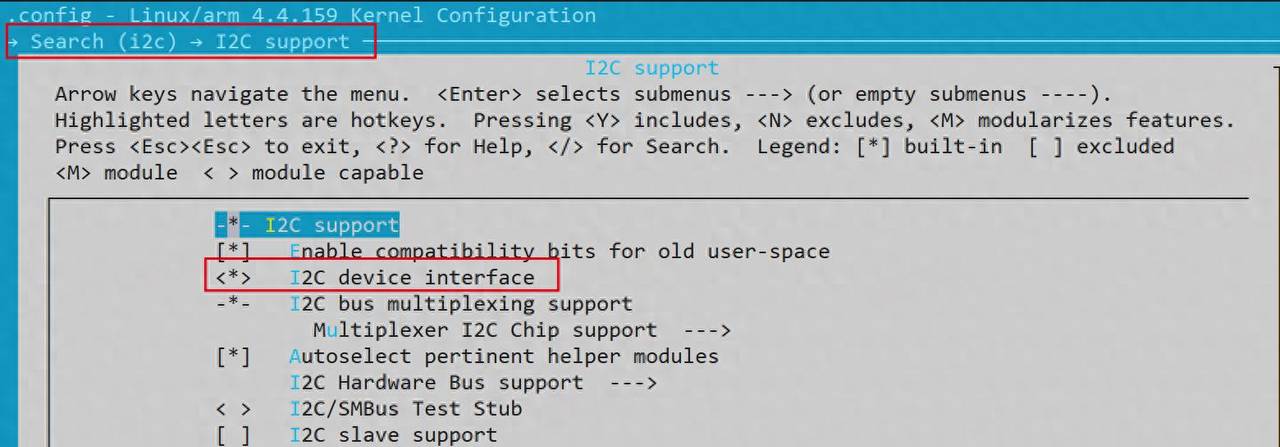
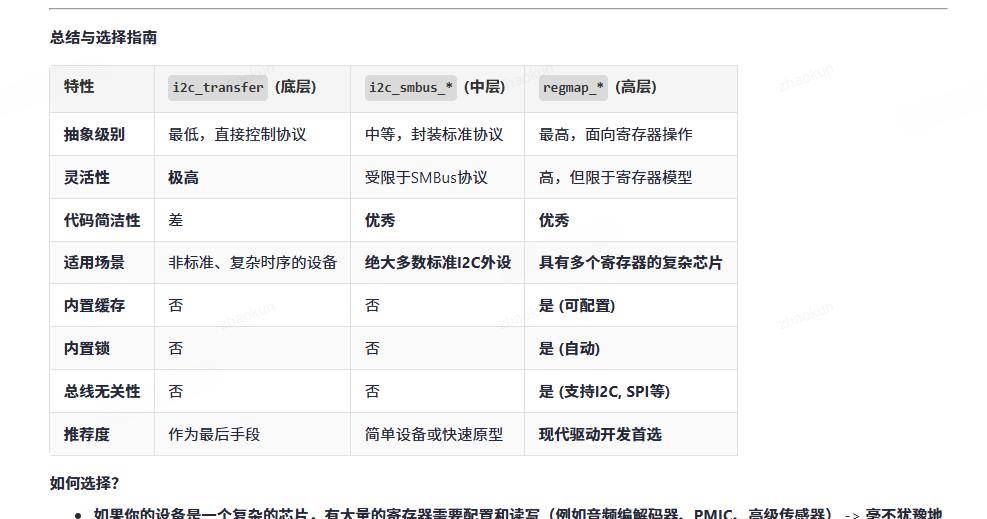
在驱动中进行i2c的读写操作一般有3种方式,如下:
内核中主要有三大类I2C通信方式,按抽象层次从低到高排列:

通用I2C消息传输 (Generic I2C Messaging): 这是最基础、最灵活的方式,可以实现任何I2C协议。
SMBus 协议函数: 针对遵循SMBus规范的设备,提供了一套简单易用的API。i2c_smbus_write_byte_data 就是其中之一。
Regmap API: 这是一个更高级的抽象层,它封装了I2C和SPI的寄存器访问,强烈推荐用于具有大量寄存器的复杂设备。
日志
添加打印日志信息分析步骤
第1步:
第2步:
...
代码片段
设备树
    virt_i2c: i2c@0 {
        compatible = "my-company,virt-i2c";
        #address-cells = <1>;
        #size-cells = <0>;

        /* 在此虚拟总线上定义一个虚拟设备 */
        virtual_eeprom: eeprom@50 {
            compatible = "my-company,virt-dev";
            reg = <0x50>; /* I2C 从设备地址 */
        };
    };
i2c控制器代码
// virt-i2c-bus.c
#include <linux/module.h>
#include <linux/kernel.h>
#include <linux/platform_device.h>
#include <linux/i2c.h>
#include <linux/of.h>
#include <linux/slab.h>

#define VIRT_I2C_BUS_NAME "virt-i2c-bus"
#define VIRT_I2C_SLAVE_ADDR 0x50 // 虚拟设备的I2C地址
#define VIRT_I2C_REG_SIZE 256     // 虚拟设备有256字节的寄存器空间

// 私有数据结构,保存适配器和虚拟寄存器
struct virt_i2c_bus {
    struct i2c_adapter adap;
    struct i2c_algorithm algo;
    struct device *dev;
    u8 reg_data[VIRT_I2C_REG_SIZE]; // 模拟设备的内存
};

/*
struct i2c_msg {
    __u16 addr;    // 从设备地址
    __u16 flags;   // 标志位 (0 表明写,I2C_M_RD:1 表明读)
    __u16 len;     // 数据缓冲区长度
    __u8 *buf;     // 指向数据的指针
};

*/
// 核心功能:模拟I2C传输
static int virt_i2c_xfer(struct i2c_adapter *adap, struct i2c_msg *msgs, int num)
{
    struct virt_i2c_bus *bus = i2c_get_adapdata(adap);
    struct i2c_msg *msg;
    int i, j;
    unsigned int offset = 0;

    pr_info("virt_i2c_xfer: num of msgs = %d
", num);

    for (i = 0; i < num; i++) {
        msg = &msgs[i];

        // 检查是否是我们的虚拟从设备地址
        if (msg->addr != VIRT_I2C_SLAVE_ADDR) {
            pr_err("virt_i2c_xfer: invalid slave address 0x%02x
", msg->addr);
            return -ENXIO; // No such device or address
        }

        if (msg->flags & I2C_M_RD) {
            // --- 读操作 ---
            pr_info("virt_i2c_xfer: Reading %d bytes from offset %u
", msg->len, offset);
            if (offset + msg->len > VIRT_I2C_REG_SIZE) {
                pr_err("virt_i2c_xfer: Read out of bounds
");
                return -EIO;
            }
            memcpy(msg->buf, &bus->reg_data[offset], msg->len);
        } else {
            // --- 写操作 ---
            // 常见的I2C设备协议:第一个字节是寄存器地址/偏移量
            if (msg->len > 0) {
                offset = msg->buf[0];
                pr_info("virt_i2c_xfer: Writing %d bytes to offset %u
", msg->len - 1, offset);

                if (offset + msg->len - 1 > VIRT_I2C_REG_SIZE) {
                    pr_err("virt_i2c_xfer: Write out of bounds
");
                    return -EIO;
                }
                // 将数据写入我们的虚拟寄存器
                if (msg->len > 1) {
                    memcpy(&bus->reg_data[offset], &msg->buf[1], msg->len - 1);
                }
                // 打印写入的一些数据用于调试
                for(j = 0; j < msg->len-1 && j < 8; j++) {
                    pr_info("  data[%d]=0x%02x", j, msg->buf[j+1]);
                }
            }
        }
    }

    return num; // 返回成功处理的消息数量
}

static u32 virt_i2c_func(struct i2c_adapter *adap)
{
    return I2C_FUNC_I2C | I2C_FUNC_SMBUS_EMUL;
}

static const struct i2c_algorithm virt_i2c_algo = {
    .master_xfer = virt_i2c_xfer, // 实现I2C传输
    .functionality = virt_i2c_func, // 实现I2C功能
};

static int virt_i2c_bus_probe(struct platform_device *pdev)
{
    struct virt_i2c_bus *bus;
    int ret;
    int i;

    bus = devm_kzalloc(&pdev->dev, sizeof(*bus), GFP_KERNEL);
    if (!bus)
        return -ENOMEM;

    bus->dev = &pdev->dev;
    platform_set_drvdata(pdev, bus);

    // 初始化虚拟寄存器 (例如,用递增的值填充)
    for (i = 0; i < VIRT_I2C_REG_SIZE; i++) {
        bus->reg_data[i] = i;
    }

    // 设置 i2c_adapter
    bus->adap.owner = THIS_MODULE;
    bus->adap.class = I2C_CLASS_HWMON; // 类别可以自选
    /*i2cdetect -l 查看I2C总线编号和名称
        例如:i2cdetect -l
        i2c-2   i2c             Virtual I2C Bus1                        I2C adapter
    */
    snprintf(bus->adap.name, sizeof(bus->adap.name), "Virtual I2C Bus");
    bus->adap.algo = &virt_i2c_algo;
    bus->adap.dev.parent = &pdev->dev;
    bus->adap.dev.of_node = pdev->dev.of_node;
    i2c_set_adapdata(&bus->adap, bus);

    ret = i2c_add_adapter(&bus->adap);
    if (ret) {
        dev_err(&pdev->dev, "Failed to add virtual i2c adapter
");
        return ret;
    }

    dev_info(&pdev->dev, "Virtual I2C adapter registered (bus %d)
", bus->adap.nr);

    return 0;
}

static int virt_i2c_bus_remove(struct platform_device *pdev)
{
    struct virt_i2c_bus *bus = platform_get_drvdata(pdev);
    i2c_del_adapter(&bus->adap);
    dev_info(&pdev->dev, "Virtual I2C adapter unregistered
");
    return 0;
}

static const struct of_device_id virt_i2c_bus_of_match[] = {
    { .compatible = "my-company,virt-i2c" },
    { },
};
MODULE_DEVICE_TABLE(of, virt_i2c_bus_of_match);

static struct platform_driver virt_i2c_bus_driver = {
    .driver = {
        .name = VIRT_I2C_BUS_NAME,
        .of_match_table = virt_i2c_bus_of_match,
    },
    .probe = virt_i2c_bus_probe,
    .remove = virt_i2c_bus_remove,
};

module_platform_driver(virt_i2c_bus_driver);

MODULE_LICENSE("GPL");
MODULE_AUTHOR("Your Name");
MODULE_DESCRIPTION("A virtual I2C bus controller driver");
i2c测试程序 A) 实现一个简单的写操作 这个操作需要发送两个字节:寄存器地址 0x10 和数据 0xAB。
B) 实现一个读操作 这是一个典型的“组合消息”: 先发送一个“写”消息,内容是要读取的寄存器地址 (0x10)。 紧接着发送一个“读”消息,来接收数据。这两个操作之间没有STOP信号。
/*
 * FilePath: drivers/i2c/virt-i2c-dev.c
 */
#include <linux/module.h>
#include <linux/kernel.h>
#include <linux/i2c.h>
#include <linux/of.h>
#include <linux/slab.h> // for kzalloc/kfree
#include <linux/sysfs.h> // for sysfs
#include <linux/mutex.h> // for mutex
#include <linux/regmap.h>

#define TEST_REG_ADDR 0x10
#define TEST_VALUE 0xAB

// 1. 定义私有数据结构
struct virt_i2c_dev {
    struct i2c_client *client;
    struct mutex lock;      // 保护对设备和last_val的并发访问
    s32 last_val;           // 存储上一次读/写的值
    struct regmap *regmap;      // <<< 新增: regmap 实例
};

static const struct regmap_config virt_i2c_regmap_config = {
    .reg_bits = 8,
    .val_bits = 8,
    // 我们的虚拟控制器没有更复杂的配置,所以保持简单
};

int my_regmap_write(struct virt_i2c_dev *priv, unsigned int reg_addr, unsigned int data)
{
    return regmap_write(priv->regmap, reg_addr, data);
}

// <<< 新增: regmap 读函数
int my_regmap_read(struct virt_i2c_dev *priv, unsigned int reg_addr)
{
    unsigned int data;
    int ret;
    ret = regmap_read(priv->regmap, reg_addr, &data);
    if (ret < 0) {
        dev_err(&priv->client->dev, "Failed to read from register 0x%02x
", reg_addr);
        return ret;
    }
    return data;
}

int my_i2c_write(struct i2c_client *client, u8 reg_addr, u8 data) {
    u8 buf[2];
    struct i2c_msg msg;

    buf[0] = reg_addr; // 寄存器地址
    buf[1] = data; // 要写入的数据

    msg.addr = client->addr; // 从设备地址
    msg.flags = 0;           // 标志位为0,表明写操作
    msg.len = 2;             // 我们要发送2个字节
    msg.buf = buf;           // 数据缓冲区

    // 发送一个消息
    if (i2c_transfer(client->adapter, &msg, 1) != 1) {
        dev_err(&client->dev, "Failed to write using i2c_transfer
");
        return -EIO;
    }
    return 0;
}

u8 my_i2c_read(struct i2c_client *client, u8 reg_addr) {
    u8 read_val;
    struct i2c_msg msgs[2];

    // 消息1: 写寄存器地址
    msgs[0].addr = client->addr;
    msgs[0].flags = 0; // 写
    msgs[0].len = 1;
    msgs[0].buf = ®_addr;

    // 消息2: 从该地址读取数据
    msgs[1].addr = client->addr;
    msgs[1].flags = I2C_M_RD; // 读
    msgs[1].len = 1;
    msgs[1].buf = &read_val;

    // 执行包含2个消息的事务
    if (i2c_transfer(client->adapter, msgs, 2) != 2) {
        dev_err(&client->dev, "Failed to perform combined read
");
        return -EIO;
    }

    return read_val;
}

// 2. 实现 'store' 函数 (处理 `echo "..." > i2c_access` )
static ssize_t i2c_access_store(struct device *dev, struct device_attribute *attr,
                                const char *buf, size_t count)
{
    struct i2c_client *client = to_i2c_client(dev);
    struct virt_i2c_dev *priv = i2c_get_clientdata(client);
    unsigned int reg, val;
    char rw;
    int ret;

    // 解析输入: "w <reg> <val>" or "r <reg>"
    if (sscanf(buf, "w %x %x", ®, &val) == 2) {
        // --- 写操作 ---
        dev_info(dev, "sysfs: Writing 0x%02x to register 0x%02x
", val, reg);

        mutex_lock(&priv->lock);
        // ret = my_i2c_write(client, reg, val);
        // ret = i2c_smbus_write_byte_data(client, reg, val);
        ret = my_regmap_write(priv, reg, val);
        if (ret < 0) {
            dev_err(dev, "sysfs: Failed to write to register 0x%02x
", reg);
            mutex_unlock(&priv->lock);
            return ret;
        }
        priv->last_val = val;
        mutex_unlock(&priv->lock);

    } else if (sscanf(buf, "r %x", ®) == 1) {
        // --- 读操作 ---
        dev_info(dev, "sysfs: Reading from register 0x%02x
", reg);

        mutex_lock(&priv->lock);

        //ret = my_i2c_read(client, reg);
        // ret = i2c_smbus_read_byte_data(client, reg);
        ret = my_regmap_read(priv, reg);
        if (ret < 0) {
            dev_err(dev, "sysfs: Failed to read from register 0x%02x
", reg);
            mutex_unlock(&priv->lock);
            return ret;
        }

        priv->last_val = ret;
        mutex_unlock(&priv->lock);

        dev_info(dev, "sysfs: Read value 0x%02x
", ret);

    } else {
        dev_err(dev, "Invalid format. Use 'w <reg> <val>' or 'r <reg>'
");
        return -EINVAL;
    }

    return count; // 成功时返回消耗的字节数
}

// 3. 实现 'show' 函数 (处理 `cat i2c_access` )
static ssize_t i2c_access_show(struct device *dev, struct device_attribute *attr,
                               char *buf)
{
    struct i2c_client *client = to_i2c_client(dev);
    struct virt_i2c_dev *priv = i2c_get_clientdata(client);
    int ret;

    mutex_lock(&priv->lock);
    // 使用 scnprintf 格式化输出到用户缓冲区
    ret = scnprintf(buf, PAGE_SIZE, "0x%02x
", priv->last_val);
    mutex_unlock(&priv->lock);

    return ret;
}

// 4. 使用 DEVICE_ATTR_RW 宏定义 sysfs 属性
//    它会自动创建 dev_attr_i2c_access 变量,并关联 show/store 函数
static DEVICE_ATTR_RW(i2c_access);

// probe 函数修改
static int virt_i2c_dev_probe(struct i2c_client *client,
                              const struct i2c_device_id *id)
{
    struct virt_i2c_dev *priv;
    s32 read_val;
    int ret;

    // 分配私有数据结构
    priv = devm_kzalloc(&client->dev, sizeof(*priv), GFP_KERNEL);
    if (!priv)
        return -ENOMEM;

    priv->client = client;
    mutex_init(&priv->lock);
    i2c_set_clientdata(client, priv);

    // 初始化 regmap
    priv->regmap = devm_regmap_init_i2c(client, &virt_i2c_regmap_config);
    if (IS_ERR(priv->regmap)) {
        dev_err(&client->dev, "Failed to initialize regmap: %ld
",
                PTR_ERR(priv->regmap));
        return PTR_ERR(priv->regmap);
    }

    dev_info(&client->dev, "Probe called for virtual I2C device
");

    // --- 原有的启动自检程序 (保留,用于确认驱动加载时基本功能正常) ---
    dev_info(&client->dev, "--- Running probe self-test ---
");
    read_val = i2c_smbus_read_byte_data(client, TEST_REG_ADDR);
    if (read_val < 0) {
        dev_err(&client->dev, "Self-test: Failed to read from reg 0x%x
", TEST_REG_ADDR);
        return read_val;
    }
    dev_info(&client->dev, "Self-test: Initial value at reg 0x%x is 0x%02x
", TEST_REG_ADDR, read_val);

    ret = i2c_smbus_write_byte_data(client, TEST_REG_ADDR, TEST_VALUE);
    if (ret < 0) {
        dev_err(&client->dev, "Self-test: Failed to write to reg 0x%x
", TEST_REG_ADDR);
        return ret;
    }

    read_val = i2c_smbus_read_byte_data(client, TEST_REG_ADDR);
    if (read_val == TEST_VALUE) {
        dev_info(&client->dev, "Self-test: SUCCESS
");
    } else {
        dev_err(&client->dev, "Self-test: FAILURE
");
    }
    priv->last_val = read_val; // 初始化 last_val
    dev_info(&client->dev, "--------------------------------
");

    // 5. 创建 sysfs 文件
    ret = device_create_file(&client->dev, &dev_attr_i2c_access);
    if (ret) {
        dev_err(&client->dev, "Failed to create sysfs file 'i2c_access'
");
        // devm_kzalloc 会自动处理 priv 的释放,无需手动 kfree
        return ret;
    }

    dev_info(&client->dev, "Sysfs attribute 'i2c_access' created.
");

    return 0;
}

// remove 函数修改
static int virt_i2c_dev_remove(struct i2c_client *client)
{
    // 6. 移除 sysfs 文件
    device_remove_file(&client->dev, &dev_attr_i2c_access);
    dev_info(&client->dev, "Sysfs attribute 'i2c_access' removed.
");
    dev_info(&client->dev, "Virtual I2C device removed
");
    return 0;
}

static const struct i2c_device_id virt_i2c_dev_id[] = {
    { "virt-dev", 0 },
    { }
};
MODULE_DEVICE_TABLE(i2c, virt_i2c_dev_id);

static const struct of_device_id virt_i2c_dev_of_match[] = {
    { .compatible = "my-company,virt-dev" },
    { }
};
MODULE_DEVICE_TABLE(of, virt_i2c_dev_of_match);

static struct i2c_driver virt_i2c_dev_driver = {
    .driver = {
        .name = "virt-i2c-dev",
        .of_match_table = virt_i2c_dev_of_match,
    },
    .probe = virt_i2c_dev_probe,
    .remove = virt_i2c_dev_remove,
    .id_table = virt_i2c_dev_id,
};

module_i2c_driver(virt_i2c_dev_driver);

MODULE_LICENSE("GPL");
MODULE_AUTHOR("Your Name");
MODULE_DESCRIPTION("Test client driver with sysfs support for the virtual I2C bus");
日志
/ko # insmod virt-i2c-bus.ko
virt-i2c-bus i2c@0: Virtual I2C adapter registered (bus 2)

/ko # i2cdetect -l
i2c-2   i2c             Virtual I2C Bus                         I2C adapter

/ko # i2cdetect -r -y 2
     0  1  2  3  4  5  6  7  8  9  a  b  c  d  e  f
00:          -- -- -- -- -- -- -- -- -- -- -- -- --
10: -- -- -- -- -- -- -- -- -- -- -- -- -- -- -- --
20: -- -- -- -- -- -- -- -- -- -- -- -- -- -- -- --
30: -- -- -- -- -- -- -- -- -- -- -- -- -- -- -- --
40: -- -- -- -- -- -- -- -- -- -- -- -- -- -- -- --
50: 50 -- -- -- -- -- -- -- -- -- -- -- -- -- -- --
60: -- -- -- -- -- -- -- -- -- -- -- -- -- -- -- --
70: -- -- -- -- -- -- -- --

/ko # i2cdump -f -y 2 0x50
     0  1  2  3  4  5  6  7  8  9  a  b  c  d  e  f    0123456789abcdef
00: 00 01 02 03 04 05 06 07 08 09 0a 0b 0c 0d 0e 0f    .???????????????
10: 10 11 12 13 14 15 16 17 18 19 1a 1b 1c 1d 1e 1f    ????????????????
20: 20 21 22 23 24 25 26 27 28 29 2a 2b 2c 2d 2e 2f     !"#$%&'()*+,-./
30: 30 31 32 33 34 35 36 37 38 39 3a 3b 3c 3d 3e 3f    0123456789:;<=>?
40: 40 41 42 43 44 45 46 47 48 49 4a 4b 4c 4d 4e 4f    @ABCDEFGHIJKLMNO
50: 50 51 52 53 54 55 56 57 58 59 5a 5b 5c 5d 5e 5f    PQRSTUVWXYZ[]^_
60: 60 61 62 63 64 65 66 67 68 69 6a 6b 6c 6d 6e 6f    `abcdefghijklmno
70: 70 71 72 73 74 75 76 77 78 79 7a 7b 7c 7d 7e 7f    pqrstuvwxyz{|}~?
80: 80 81 82 83 84 85 86 87 88 89 8a 8b 8c 8d 8e 8f    ????????????????
90: 90 91 92 93 94 95 96 97 98 99 9a 9b 9c 9d 9e 9f    ????????????????
a0: a0 a1 a2 a3 a4 a5 a6 a7 a8 a9 aa ab ac ad ae af    ????????????????
b0: b0 b1 b2 b3 b4 b5 b6 b7 b8 b9 ba bb bc bd be bf    ????????????????
c0: c0 c1 c2 c3 c4 c5 c6 c7 c8 c9 ca cb cc cd ce cf    ????????????????
d0: d0 d1 d2 d3 d4 d5 d6 d7 d8 d9 da db dc dd de df    ????????????????
e0: e0 e1 e2 e3 e4 e5 e6 e7 e8 e9 ea eb ec ed ee ef    ????????????????
f0: f0 f1 f2 f3 f4 f5 f6 f7 f8 f9 fa fb fc fd fe ff    ???????????????.

/ko # dmesg -n 7
/ko # insmod virt-i2c-dev.ko
virt-i2c-dev 2-0050: Probe called for virtual I2C device
virt-i2c-dev 2-0050: --- Running probe self-test ---
virt_i2c_xfer: num of msgs = 2
virt_i2c_xfer: Writing 0 bytes to offset 16
virt_i2c_xfer: Reading 1 bytes from offset 16
virt-i2c-dev 2-0050: Self-test: Initial value at reg 0x10 is 0x10
virt_i2c_xfer: num of msgs = 1
virt_i2c_xfer: Writing 1 bytes to offset 16
  data[0]=0xab
virt_i2c_xfer: num of msgs = 2
virt_i2c_xfer: Writing 0 bytes to offset 16
virt_i2c_xfer: Reading 1 bytes from offset 16
virt-i2c-dev 2-0050: Self-test: SUCCESS
virt-i2c-dev 2-0050: --------------------------------
virt-i2c-dev 2-0050: Sysfs attribute 'i2c_access' created.

查看下面有多少个设备
ls -al /sys/class/i2c-adapter/i2c-2/
total 0
drwxr-xr-x    5 root     root             0 Jan  1 00:00 .
drwxr-xr-x    4 root     root             0 Jan  1 00:00 ..
drwxr-xr-x    3 root     root             0 Jan  1 00:00 2-0050
--w-------    1 root     root          4096 Jan  1 00:04 delete_device
lrwxrwxrwx    1 root     root             0 Jan  1 00:04 device -> ../../i2c@0
drwxr-xr-x    3 root     root             0 Jan  1 00:00 i2c-dev
-r--r--r--    1 root     root          4096 Jan  1 00:04 name
--w-------    1 root     root          4096 Jan  1 00:04 new_device
lrwxrwxrwx    1 root     root             0 Jan  1 00:04 of_node -> ../../../../firmware/devicetree/base/i2c@0
drwxr-xr-x    2 root     root             0 Jan  1 00:04 power
lrwxrwxrwx    1 root     root             0 Jan  1 00:04 subsystem -> ../../../../bus/i2c
-rw-r--r--    1 root     root          4096 Jan  1 00:00 uevent

通过sys节点进行读写i2c设备
/sys # find ./ -name i2c_access
./devices/platform/i2c@0/i2c-2/2-0050/i2c_access

cd ./devices/platform/i2c@0/i2c-2/2-0050/
/sys/devices/platform/i2c@0/i2c-2/2-0050 # ls
driver      modalias    of_node     subsystem
i2c_access  name        power       uevent

/sys/devices/platform/i2c@0/i2c-2/2-0050 # echo 'w 30 ee' > i2c_access
virt-i2c-dev 2-0050: sysfs: Writing 0xee to register 0x30
virt_i2c_xfer: num of msgs = 1
virt_i2c_xfer: Writing 1 bytes to offset 48
  data[0]=0xee/sys/devices/platform/i2c@0/i2c-2/2-0050 # echo 'r 30' > i2c_access

virt-i2c-dev 2-0050: sysfs: Reading from register 0x30
virt_i2c_xfer: num of msgs = 2
virt_i2c_xfer: Writing 0 bytes to offset 48
virt_i2c_xfer: Reading 1 bytes from offset 48
virt-i2c-dev 2-0050: sysfs: Read value 0xee
/sys/devices/platform/i2c@0/i2c-2/2-0050 # cat i2c_access
0xee

/sys/devices/platform/i2c@0/i2c-2/2-0050 # i2cdump -f -y 2 0x50
     0  1  2  3  4  5  6  7  8  9  a  b  c  d  e  f    0123456789abcdef
00: 00 01 02 03 04 05 06 07 08 09 0a 0b 0c 0d 0e 0f    .???????????????
10: ab 11 12 13 14 15 16 17 18 19 1a 1b 1c 1d 1e 1f    ????????????????
20: 20 21 22 23 24 25 26 27 28 29 2a 2b 2c 2d 2e 2f     !"#$%&'()*+,-./
30: ee 31 32 33 34 35 36 37 38 39 3a 3b 3c 3d 3e 3f    ?123456789:;<=>?
40: 40 41 42 43 44 45 46 47 48 49 4a 4b 4c 4d 4e 4f    @ABCDEFGHIJKLMNO
50: 50 51 52 53 54 55 56 57 58 59 5a 5b 5c 5d 5e 5f    PQRSTUVWXYZ[]^_
60: 60 61 62 63 64 65 66 67 68 69 6a 6b 6c 6d 6e 6f    `abcdefghijklmno
70: 70 71 72 73 74 75 76 77 78 79 7a 7b 7c 7d 7e 7f    pqrstuvwxyz{|}~?
80: 80 81 82 83 84 85 86 87 88 89 8a 8b 8c 8d 8e 8f    ????????????????
90: 90 91 92 93 94 95 96 97 98 99 9a 9b 9c 9d 9e 9f    ????????????????
a0: a0 a1 a2 a3 a4 a5 a6 a7 a8 a9 aa ab ac ad ae af    ????????????????
b0: b0 b1 b2 b3 b4 b5 b6 b7 b8 b9 ba bb bc bd be bf    ????????????????
c0: c0 c1 c2 c3 c4 c5 c6 c7 c8 c9 ca cb cc cd ce cf    ????????????????
d0: d0 d1 d2 d3 d4 d5 d6 d7 d8 d9 da db dc dd de df    ????????????????
e0: e0 e1 e2 e3 e4 e5 e6 e7 e8 e9 ea eb ec ed ee ef    ????????????????
f0: f0 f1 f2 f3 f4 f5 f6 f7 f8 f9 fa fb fc fd fe ff    ???????????????.
图片
✅ 结论
输出结论
待查资料问题
- ❓ 问题 1:?
- ❓ 问题 2:?
参考链接
- 官方文档
© 版权声明
文章版权归作者所有,未经允许请勿转载。
相关文章



暂无评论...