
核心创新:上下文光学压缩
DeepSeek-OCR的核心创新在于提出了 “上下文光学压缩” (Contexts Optical Compression) 这一全新范式。 通俗地说,它的基本思路是:将长文本渲染成图像,通过视觉编码器压缩成极少的“视觉token”,最后由语言模型来“解压”并还原原始文本。
这种方法带来了惊人的效率提升:在压缩比高达10倍(即1000个文字token被压缩为100个视觉token)时,模型解码的OCR精度仍能保持在约97%。这为解决大模型处理长文本时计算开销巨大的问题提供了一个全新的方向。
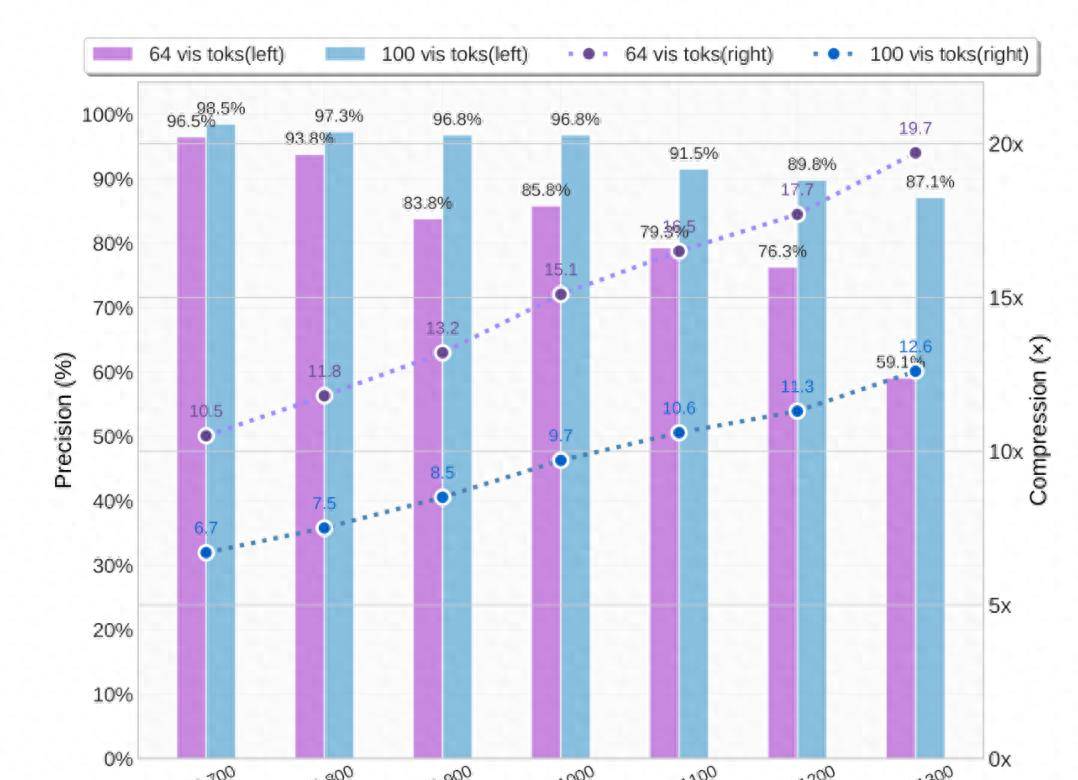
这张图是真实文本token数 与 模型使用的视觉token数 的对比,大体也可以看出文本量越大,压缩比越大。
模型架构与技术细节
为了实现这一创新,DeepSeek-OCR采用了独特的双组件架构:
- DeepEncoder (视觉编码器):这是一个专为高压缩设计的视觉编码器。
- 结构融合:它巧妙地融合了SAM(擅长局部视觉感知)和CLIP(擅长全局语义知识)两种模型的优势。
- 核心压缩:在两者之间加入了一个16倍的卷积压缩模块,能够将4096个图像patch token大幅压缩至仅256个,从而极大地减少了后续处理的开销。
- DeepSeek-3B-MoE (解码器):解码器部分采用了混合专家模型 (Mixture-of-Experts) 架构。在推理时,虽然模型总参数量为30亿,但实际激活的参数仅约5.7亿,这使得它既能保持强劲的语言能力,又具有接近小模型的推理效率。
为了适应不同的应用场景,模型支持多种分辨率模式:
- 原生分辨率模式:例如Tiny (512×512), Small (640×640), Base (1024×1024), Large (1280×1280)。
- 动态分辨率模式 (Gundam模式):专门用于处理超高分辨率输入的复杂文档(如报纸),通过瓦片化(tiling)技术进一步减少内存消耗
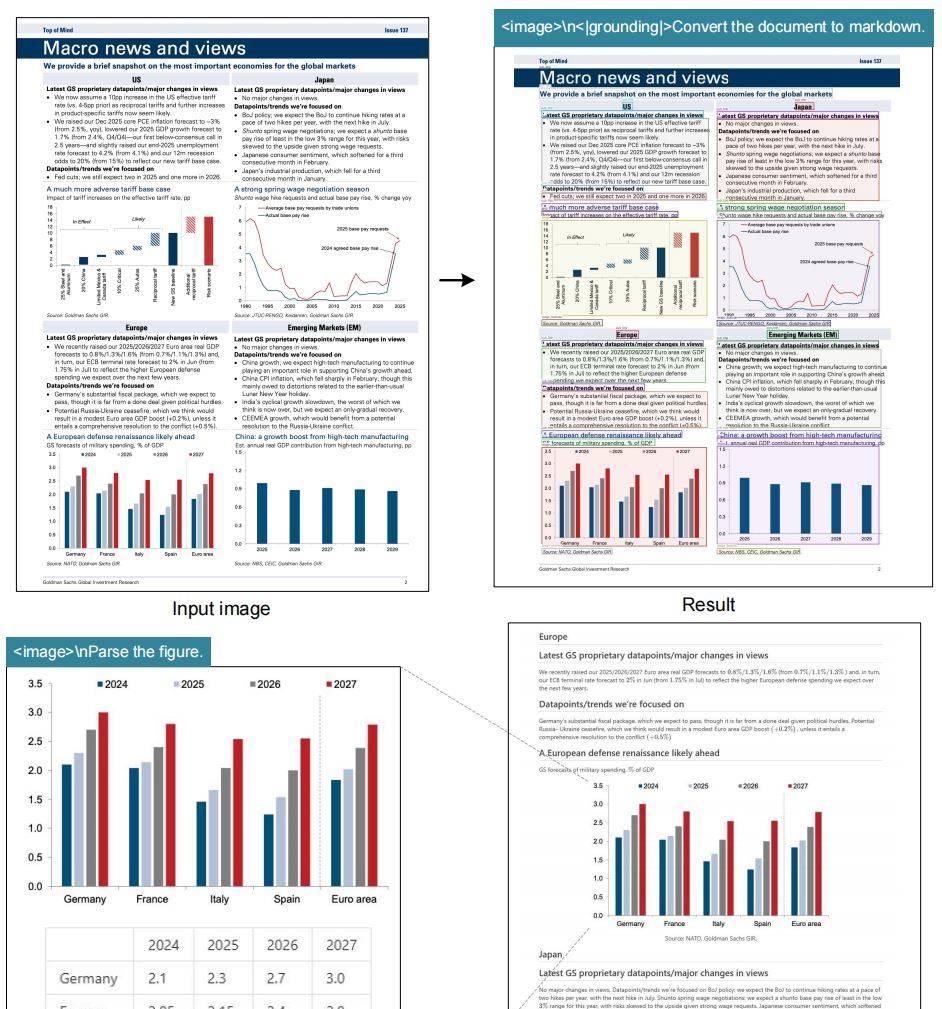
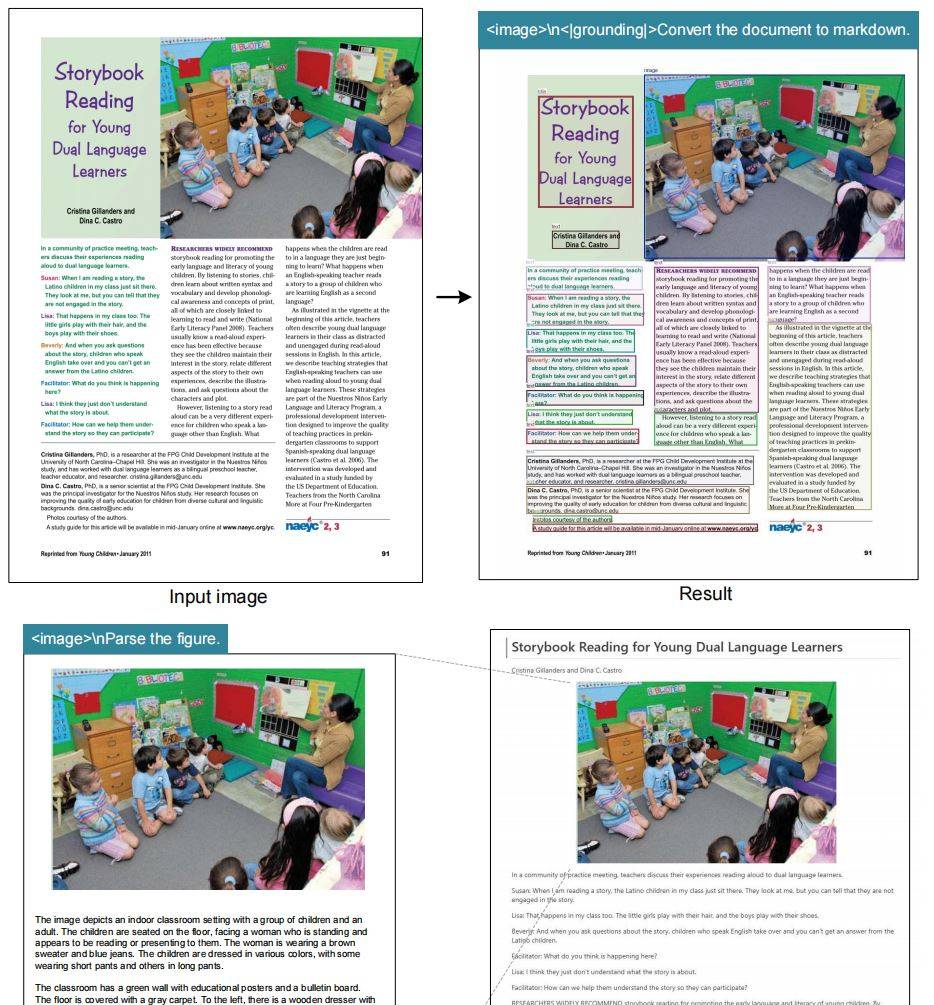
上述两张图实则说的是,deepseek ocr 不仅仅可以将图片中的文字一比一的还原到md文档中,还可以将图片中的图片再画成一张图片保存到你的md文档中。更厉害的是它还可以对图片中的图片进行分析描述、甚至可以将图表中的数据提取出来再给你总结总结。
深度解析能力
- 图表解析:将复杂图表转换为结构化HTML表格
- 化学公式:识别并解析SMILES格式的化学结构
- 几何图形:理解平面几何图形的关系和属性
- 自然图像:具备通用视觉理解能力
灵活的分辨率模式
针对不同场景需求,提供多种分辨率模式:
- Tiny模式(512×512):64个token,适合简单文档
- Small模式(640×640):100个token,平衡性能与效率
- Base/Large模式:更高精度处理
- Gundam模式:动态分辨率,应对超高清复杂文档
安装的话
你也可以参考
https://github.com/deepseek-ai/DeepSeek-OCR.git
Install
Our environment is cuda11.8+torch2.6.0.
- Clone this repository and navigate to the DeepSeek-OCR folder
git clone https://github.com/deepseek-ai/DeepSeek-OCR.git- Conda
conda create -n deepseek-ocr python=3.12.9 -y
conda activate deepseek-ocr- Packages
- download the vllm-0.8.5 whl
pip install torch==2.6.0 torchvision==0.21.0 torchaudio==2.6.0 --index-url https://download.pytorch.org/whl/cu118
pip install vllm-0.8.5+cu118-cp38-abi3-manylinux1_x86_64.whl
pip install -r requirements.txt
pip install flash-attn==2.7.3 --no-build-isolation
Note: if you want vLLM and transformers codes to run in the same environment, you don't need to worry about this installation error like: vllm 0.8.5+cu118 requires transformers>=4.51.1
vLLM-Inference
- VLLM:
Note: change the INPUT_PATH/OUTPUT_PATH and other settings in the DeepSeek-OCR-master/DeepSeek-OCR-vllm/config.py
cd DeepSeek-OCR-master/DeepSeek-OCR-vllm- image: streaming output
python run_dpsk_ocr_image.py- pdf: concurrency ~2500tokens/s(an A100-40G)
python run_dpsk_ocr_pdf.py- batch eval for benchmarks
python run_dpsk_ocr_eval_batch.py[2025/10/23] The version of upstream vLLM:
uv venv
source .venv/bin/activate
# Until v0.11.1 release, you need to install vLLM from nightly build
uv pip install -U vllm --pre --extra-index-url https://wheels.vllm.ai/nightly
from vllm import LLM, SamplingParams
from vllm.model_executor.models.deepseek_ocr import NGramPerReqLogitsProcessor
from PIL import Image
# Create model instance
llm = LLM(
model="deepseek-ai/DeepSeek-OCR",
enable_prefix_caching=False,
mm_processor_cache_gb=0,
logits_processors=[NGramPerReqLogitsProcessor]
)
# Prepare batched input with your image file
image_1 = Image.open("path/to/your/image_1.png").convert("RGB")
image_2 = Image.open("path/to/your/image_2.png").convert("RGB")
prompt = "<image>
Free OCR."
model_input = [
{
"prompt": prompt,
"multi_modal_data": {"image": image_1}
},
{
"prompt": prompt,
"multi_modal_data": {"image": image_2}
}
]
sampling_param = SamplingParams(
temperature=0.0,
max_tokens=8192,
# ngram logit processor args
extra_args=dict(
ngram_size=30,
window_size=90,
whitelist_token_ids={128821, 128822}, # whitelist: <td>, </td>
),
skip_special_tokens=False,
)
# Generate output
model_outputs = llm.generate(model_input, sampling_param)
# Print output
for output in model_outputs:
print(output.outputs[0].text)Transformers-Inference
- Transformers
from transformers import AutoModel, AutoTokenizer
import torch
import os
os.environ["CUDA_VISIBLE_DEVICES"] = '0'
model_name = 'deepseek-ai/DeepSeek-OCR'

tokenizer = AutoTokenizer.from_pretrained(model_name, trust_remote_code=True)
model = AutoModel.from_pretrained(model_name, _attn_implementation='flash_attention_2', trust_remote_code=True, use_safetensors=True)
model = model.eval().cuda().to(torch.bfloat16)

# prompt = "<image>
Free OCR. "
prompt = "<image>
<|grounding|>Convert the document to markdown. "
image_file = 'your_image.jpg'
output_path = 'your/output/dir'

res = model.infer(tokenizer, prompt=prompt, image_file=image_file, output_path = output_path, base_size = 1024, image_size = 640, crop_mode=True, save_results = True, test_compress = True)
or you can
cd DeepSeek-OCR-master/DeepSeek-OCR-hf
python run_dpsk_ocr.py© 版权声明
文章版权归作者所有,未经允许请勿转载。
相关文章


您必须登录才能参与评论!
立即登录



江城圆体500W是最适合OCR压缩的字体。