Utility Argument Syntax
utility_name[-a][-b][-c option_argument]
    [-d|-e][-f[option_argument]][operand...]
- utility name
literal utility_name
- options
The arguments that consist of <hyphen-minus> characters and single letters or digits, such as a , are known as "options"
(<hyphen-minus> characters) and (single letters or digits)
- Options are usually listed in alphabetical order unless this would make the utility description more confusing. There are no implied relationships between the options based upon the order in which they appear, unless otherwise stated in the OPTIONS section, or unless the exception in Guideline 11 of Utility Syntax Guidelines applies. If an option that does not have option-arguments is repeated, the results are undefined, unless otherwise stated.
- When a utility has only a few permissible options, they are sometimes shown individually, as in the example. Utilities with many flags generally show all of the individual flags (that do not take option-arguments) grouped, as in:
utility_name [-abcDxyz][-p arg][operand]
- option_argument
Certain options are followed by an "option-argument", as shown with [ -c option_argument]
- Option-arguments are shown separated from their options by <blank> characters, except when the option-argument is enclosed in the [ and ] notation to indicate that it is optional. This reflects the situation in which an optional option-argument (if present) is included within the same argument string as the option
- for a mandatory option-argument, it is the next argument
- operands
The arguments following the last options and option-arguments are named "operands".
Frequently, names of parameters that require substitution by actual values are shown with embedded <underscore> characters.
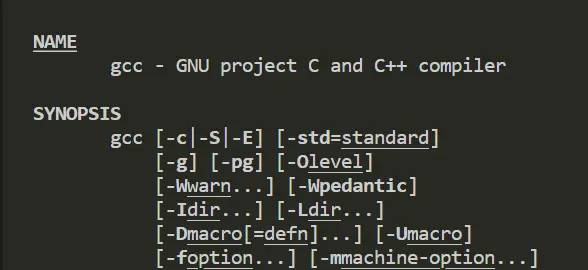
Alternatively, parameters are shown as follows: <parameter name>
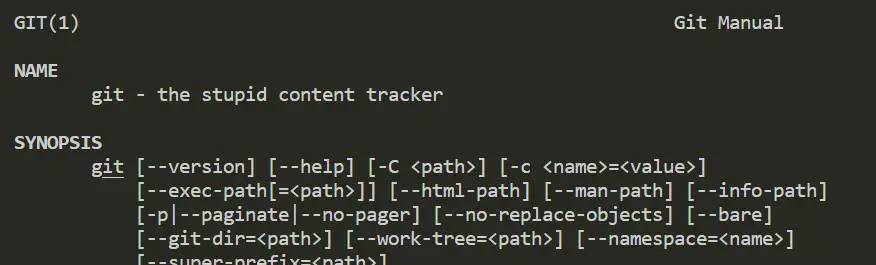
Arguments separated by the | ( <vertical-line>) bar notation are mutually-exclusive. Alternatively, mutually-exclusive options and operands may be listed with multiple synopsis lines. For example:
utility_name -d[-a][-c option_argument][operand...]
utility_name[-a][-b][operand...]
- When multiple synopsis lines are given for a utility, it is an indication that the utility has mutually-exclusive arguments.
- These mutually-exclusive arguments alter the functionality of the utility so that only certain other arguments are valid in combination with one of the mutually-exclusive arguments.
- Only one of the mutually-exclusive arguments is allowed for invocation of the utility. Unless otherwise stated in an accompanying OPTIONS section, the relationships between arguments depicted in the SYNOPSIS sections are mandatory requirements placed on conforming applications.
Ellipses ( “…” ) are used to denote that one or more occurrences of an operand are allowed. When an option or an operand followed by ellipses is enclosed in brackets, zero or more options or operands can be specified. The form:
utility_name [-g option_argument]...[operand...]
The form:
utility_name -f option_argument [-f option_argument]... [operand...]
indicates that the -f option is required to appear at least once and may appear multiple times.
Utility Syntax Guidelines
- Utility names should be between two and nine characters, inclusive.
- Utility names should include lowercase letters (the lower character classification) and digits only from the portable character set.
- All options should be preceded by the – delimiter character.
- One or more options without option-arguments, followed by at most one option that takes an option-argument, should be accepted when grouped behind one – delimiter.
The form:
utility_name [-abcDxyz[option_argument]] - When multiple option-arguments are specified to follow a single option, they should be presented as a single argument, using <comma> characters within that argument or <blank> characters within that argument to separate them.
- All options should precede operands on the command line.
- The first — argument that is not an option-argument should be accepted as a delimiter indicating the end of options. Any following arguments should be treated as operands, even if they begin with the – character.
testopt -a -- -b - The order of different options relative to one another should not matter, unless the options are documented as mutually-exclusive and such an option is documented to override any incompatible options preceding it. If an option that has option-arguments is repeated, the option and option-argument combinations should be interpreted in the order specified on the command line.
- The order of operands may matter and position-related interpretations should be determined on a utility-specific basis.
- For utilities that use operands to represent files to be opened for either reading or writing, the – operand should be used to mean only standard input (or standard output when it is clear from context that an output file is being specified) or a file named -.
- If an argument can be identified according to Guidelines 3 through 10 as an option, or as a group of options without option-arguments behind one – delimiter, then it should be treated as such.
syntax本质上和getopt函数的实现是一样的
getopt(3) – Linux manual page (man7.org)
Example of Getopt (The GNU C Library)
Michael Kerrisk – man7.org
Utility Conventions (opengroup.org)
© 版权声明
文章版权归作者所有,未经允许请勿转载。
相关文章



暂无评论...