
推荐:Python全栈教程!花了29980买的从入门到精通课程,分享给大家

学过 Python 的朋友应该都知道 f-strings 是用来超级方便的格式化输出的,觉得它的使用方法无外乎就是 print(f value = { value } ,实则,f-strings 远超你的预期,今天来梳理一下它还能做那些很酷的事情。
1、懒得再敲一遍变量名
str_value = "hello,python coders"
print(f"{ str_value = }")
# str_value =  hello,python coders
2、直接改变输出结果
num_value = 123
print(f"{num_value % 2 = }")
# num_value % 2 = 1
3、直接格式化日期
import datetime

today = datetime.date.today()
print(f"{today: %Y%m%d}")
# 20211019
print(f"{today =: %Y%m%d}")
# today = 20211019
4、2/8/16 进制输出真的太简单
>>> a = 42
>>> f"{a:b}" # 2进制
 101010
>>> f"{a:o}" # 8进制
 52
>>> f"{a:x}" # 16进制,小写字母
 2a
>>> f"{a:X}" # 16进制,大写字母
 2A
>>> f"{a:c}" # ascii 码
 *
5、格式化浮点数
>>> num_value = 123.456
>>> f {num_value = :.2f}  #保留 2 位小数
 num_value = 123.46
>>> nested_format = ".2f" #可以作为变量
>>> print(f {num_value:{nested_format}} )
123.46
6、字符串对齐,so easy!
>>> x =  test
>>> f {x:>10}    # 右对齐,左边补空格
       test
>>> f {x:*<10}   # 左对齐,右边补*
 test******
>>> f {x:=^10}   # 居中,左右补=
 ===test===
>>> x, n =  test , 10
>>> f {x:~^{n}}  # 可以传入变量 n
 ~~~test~~~
>>>
7、使用 !s,!r
>>> x =  中
>>> f"{x!s}" # 相当于 str(x)
 中
>>> f"{x!r}" # 相当于 repr(x)
" 中 "
8、自定义格式
class MyClass:
    def __format__(self, format_spec) -> str:
        print(f MyClass __format__ called with {format_spec=!r} )
        return "MyClass()"


print(f {MyClass():bala bala  %%MYFORMAT%%} )
输出如下:
MyClass __format__ called with format_spec= bala bala  %%MYFORMAT%%
MyClass()
最后
Python 的 f-string 超级灵活优雅,同时还是效率最高的字符串拼接方式:
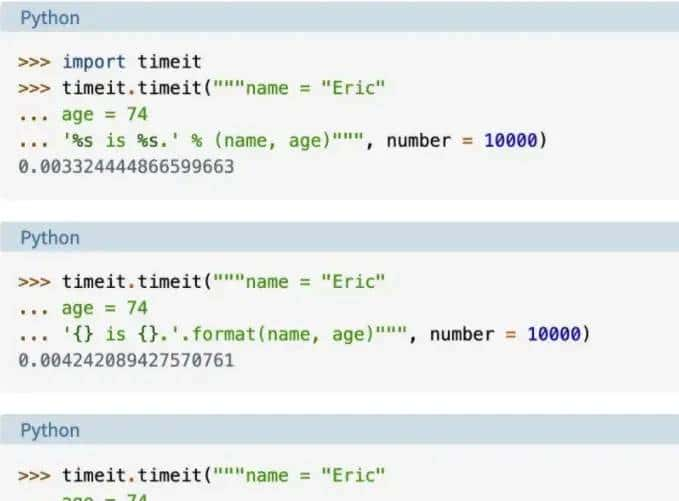
后来关于字符串的格式化,就 f-string 了。如果觉得有收获,还请三连,感谢支持!
© 版权声明
文章版权归作者所有,未经允许请勿转载。
相关文章


您必须登录才能参与评论!
立即登录








学到了,之前有用过,但是仅仅是输出变量,因为比format要方便多,没想到还可以格式化