
统计显示,超过70%的前端部署问题源于Nginx配置细节。本文通过可视化图表和实战代码,帮你彻底解决这些痛点。
部署问题分布分析
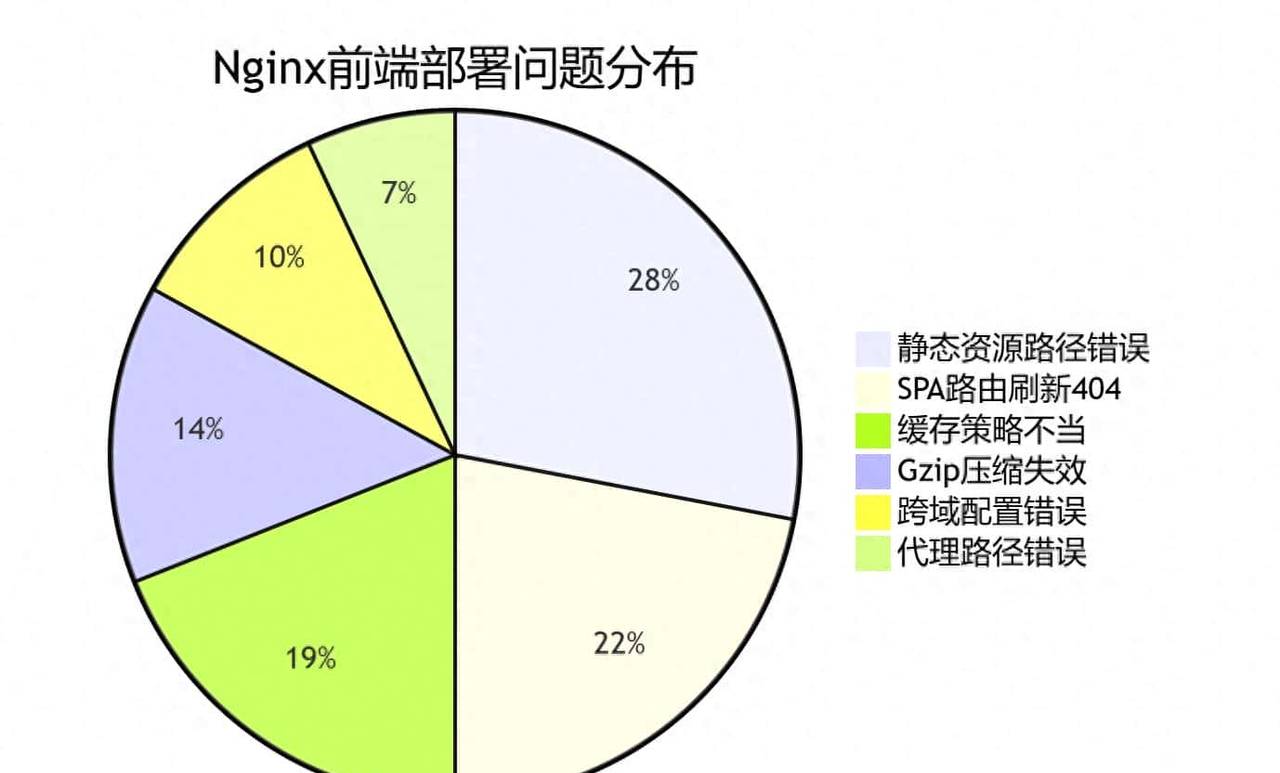
1. 静态资源路径配置错误
问题诊断与路径解析对比
典型症状矩阵:
|
症状 |
发生概率 |
影响程度 |
排查难度 |
|
首页正常,静态资源404 |
85% |
⭐⭐⭐⭐ |
⭐⭐ |
|
子路径访问白屏 |
45% |
⭐⭐⭐⭐⭐ |
⭐⭐⭐ |
|
部分资源加载异常 |
30% |
⭐⭐ |
⭐⭐⭐⭐ |
配置方案对比演示
# ❌ 错误配置示例
server {
    listen 80;
    server_name example.com;

    location / {
        root /home/www/dist;
        # 致命缺失:缺少try_files指令
        # 导致SPA路由失效,刷新404
    }

    location /app/ {
        alias /home/www/dist/;
        # alias使用错误:路径映射混乱
    }
}
# ✅ 生产级正确配置
server {
listen 80;
server_name example.com;
# 主入口配置 - 支持SPA路由
location / {
root /home/www/dist;
index index.html;
# 核心:三级回退策略
try_files $uri $uri/ /index.html;
# 执行流程:
# 1. 尝试访问具体文件 ($uri)
# 2. 尝试访问目录索引 ($uri/)
# 3. 回退到前端路由 (/index.html)
}
# 专用静态资源处理 - 提升性能
location ~* .(js|css|png|jpg|jpeg|gif|ico|svg|woff2)$ {
root /home/www/dist;
expires 1y;
add_header Cache-Control "public, immutable";
access_log off; # 静态资源不记录访问日志
}
}路径解析流程图
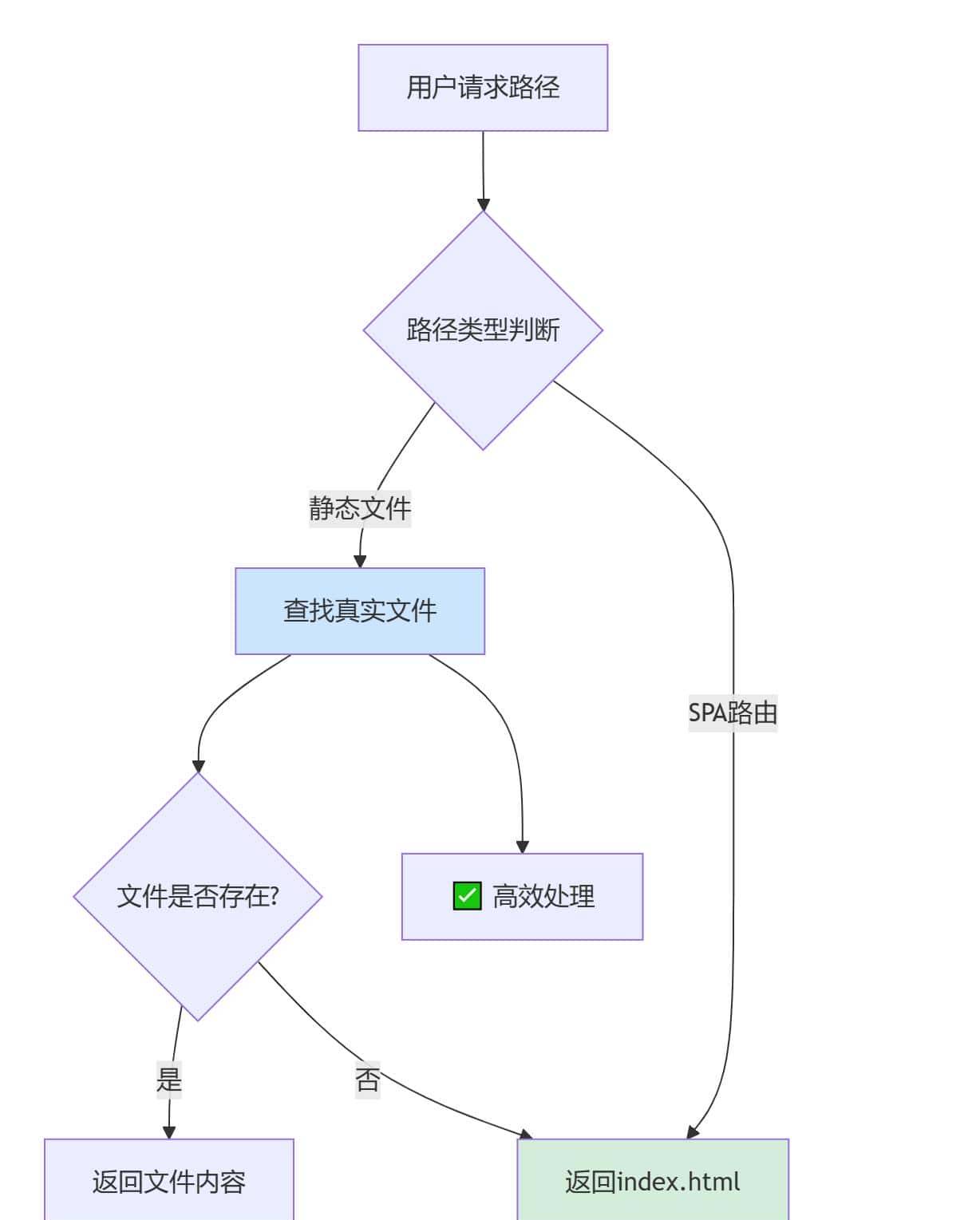
2. SPA路由刷新404问题
问题原理与解决方案对比
路由请求处理对比表:
|
请求类型 |
错误配置结果 |
正确配置结果 |
技术原理 |
|
/ |
✅ 正常显示 |
✅ 正常显示 |
匹配根路径index.html |
|
/about |
❌ 404错误 |
✅ 页面正常 |
try_files回退机制 |
|
/user/profile |
❌ 404错误 |
✅ 页面正常 |
前端路由接管 |
|
/static/logo.png |
❌/✅ 不一致 |
✅ 正常加载 |
静态文件优先匹配 |
完整SPA配置模板
#  企业级SPA路由配置方案
server {
    listen 80;
    server_name your-domain.com;

    # 基础配置
    root /home/www/dist;
    index index.html;

    # 主路由处理 - 支持深度路由
    location / {
        # 关键:路由回退机制
        try_files $uri $uri/ @spa_fallback;
    }

    # API代理 - 避免与前端路由冲突
    location /api/ {
        proxy_pass http://backend-server:3000;
        proxy_set_header Host $host;
        proxy_set_header X-Real-IP $remote_addr;

        # API特殊头信息
        add_header X-API-Version "1.0";
    }

    # SPA回退处理
    location @spa_fallback {
        rewrite ^ /index.html break;
    }

    # 性能优化:静态资源缓存
    location ~* .(?:js|css|png|jpg|jpeg|gif|ico|svg)$ {
        expires 6M;
        access_log off;
        add_header Cache-Control "public, immutable";
    }

    # 特别处理:禁止访问敏感文件
    location ~ /. {
        deny all;
        access_log off;
        log_not_found off;
    }
}
3. Gzip压缩配置优化
压缩效果数据分析
各类资源压缩率对比图表:
|
文件类型 |
原始大小 |
Gzip后 |
Brotli后 |
推荐算法 |
|
JavaScript |
1.2 MB |
420 KB |
380 KB |
Brotli |
|
CSS样式 |
350 KB |
90 KB |
75 KB |
Brotli |
|
HTML文档 |
45 KB |
12 KB |
9 KB |
Gzip |
|
图标字体 |
280 KB |
260 KB |
240 KB |
不压缩 |
完整压缩配置方案
#  多级压缩优化配置
http {
    # 基础Gzip配置
    gzip on;
    gzip_vary on;
    gzip_min_length 1024;  # 1KB以下不压缩

    # 压缩级别优化
    gzip_comp_level 6;     # 性价比最佳级别

    # 缓冲区设置
    gzip_buffers 16 8k;

    # 代理相关配置
    gzip_proxied any;

    # 完整的MIME类型支持
    gzip_types
        # 文本类
        text/plain
        text/css
        text/xml
        text/javascript
        text/markdown

        # 应用类
        application/json
        application/javascript
        application/xml
        application/xml+rss
        application/atom+xml

        # 字体类
        font/woff
        font/woff2
        application/font-woff
        application/font-woff2

        # 图像类
        image/svg+xml;

    # Brotli压缩 (需要模块支持)
    # brotli on;
    # brotli_static on;
    # brotli_comp_level 8;
    # brotli_types text/plain text/css ...;

    # 压缩统计(需要日志分析)
    log_format compression '$remote_addr - $remote_user [$time_local] '
                           '"$request" $status $body_bytes_sent '
                           '"$http_referer" "$http_user_agent" "$gzip_ratio"';
}

server {
    listen 80;
    server_name example.com;

    # 启用压缩日志
    access_log /var/log/nginx/compression.log compression;

    # 静态资源服务
    location ~* .(js|css|html)$ {
        gzip_static on;  # 使用预压缩文件
        gunzip on;       # 支持不支持gzip的客户端
    }
}
4. 跨域配置完整解决方案
CORS请求处理流程图
sequenceDiagram
    participant Client as 浏览器
    participant Nginx as Nginx网关
    participant API as 后端API

    Note over Client,API: 简单请求流程
    Client->>Nginx: GET /api/data<br/>Origin: https://frontend.com
    Nginx->>API: 转发请求
    API->>Nginx: 返回数据
    Nginx->>Nginx: 添加CORS头
    Nginx->>Client: 响应 + Access-Control-Allow-Origin

    Note over Client,API: 预检请求流程
    Client->>Nginx: OPTIONS /api/data<br/>Origin: ...<br/>Access-Control-Request-Method: PUT
    Nginx->>Nginx: 直接处理OPTIONS
    Nginx->>Client: 204 + CORS头
    Client->>Nginx: 实际PUT请求
    Nginx->>API: 转发PUT请求
    API->>Nginx: 处理结果
    Nginx->>Client: 返回最终响应
生成失败,换个方式问问吧
企业级跨域配置
# ️ 生产环境CORS配置
server {
    listen 80;
    server_name api.company.com;

    # 基础安全头
    add_header X-Frame-Options "SAMEORIGIN" always;
    add_header X-Content-Type-Options "nosniff" always;

    # API路由配置
    location /api/ {
        # 请求代理设置
        proxy_pass http://backend-service:8080;
        proxy_set_header Host $host;
        proxy_set_header X-Real-IP $remote_addr;
        proxy_set_header X-Forwarded-For $proxy_add_x_forwarded_for;

        # CORS头配置
        add_header Access-Control-Allow-Origin "https://www.company.com" always;
        add_header Access-Control-Allow-Methods "GET, POST, PUT, DELETE, OPTIONS" always;
        add_header Access-Control-Allow-Headers "Authorization, Content-Type, X-Requested-With" always;
        add_header Access-Control-Allow-Credentials "true" always;
        add_header Access-Control-Max-Age "3600" always;

        # 预检请求处理
        if ($request_method = 'OPTIONS') {
            return 204;
            add_header Content-Length 0;
            add_header Content-Type text/plain;
        }
    }

    # 静态文件跨域支持
    location ~* .(woff2|ttf|eot)$ {
        add_header Access-Control-Allow-Origin "*";
        expires 1y;
        add_header Cache-Control "public, immutable";
    }
}
5. 代理路径配置详解
Proxy_pass规则矩阵
路径转换规则对照表:
|
配置模式 |
示例配置 |
请求转换 |
适用场景 |
|
路径替换 |
location /api/ { proxy_pass http://backend/; } |
/api/user → http://backend/user |
API网关转发 |
|
路径追加 |
location /api/ { proxy_pass http://backend; } |
/api/user → http://backend/api/user |
微服务路由 |
|
重写路径 |
location /v1/ { rewrite ^/v1/(.*)$ /api/$1 break; proxy_pass http://backend; } |
/v1/user → http://backend/api/user |
版本管理 |
多环境代理配置模板
# ️ 多环境代理配置架构
upstream backend_servers {
    server 10.0.1.10:8080 weight=3;  # 主节点
    server 10.0.1.11:8080 weight=2;  # 备节点
    server 10.0.1.12:8080 weight=1;  # 热备节点

    # 负载均衡策略
    least_conn;
    keepalive 32;
}

server {
    listen 80;
    server_name gateway.company.com;

    # 健康检查
    location /health {
        access_log off;
        proxy_pass http://backend_servers/health;
    }

    # APIv1 代理配置
    location /api/v1/ {
        # 路径重写:移除版本前缀
        rewrite ^/api/v1/(.*)$ /$1 break;

        # 代理设置
        proxy_pass http://backend_servers;
        proxy_http_version 1.1;
        proxy_set_header Upgrade $http_upgrade;
        proxy_set_header Connection 'upgrade';
        proxy_set_header Host $host;
        proxy_cache_bypass $http_upgrade;

        # 超时设置
        proxy_connect_timeout 30s;
        proxy_send_timeout 30s;
        proxy_read_timeout 30s;
    }

    # WebSocket代理支持
    location /ws/ {
        proxy_pass http://backend_servers/ws/;
        proxy_http_version 1.1;
        proxy_set_header Upgrade $http_upgrade;
        proxy_set_header Connection "Upgrade";
    }
}
6. 缓存策略优化配置
缓存层级架构设计
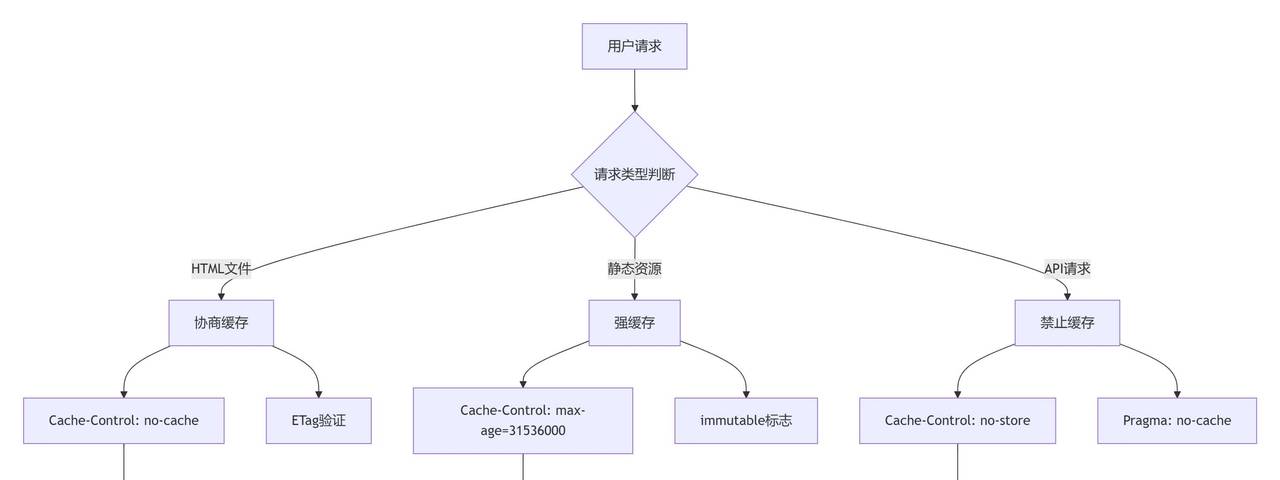
完整缓存配置方案
#  智能缓存策略配置
server {
    listen 80;
    server_name www.company.com;

    # HTML文件 - 协商缓存(确保及时更新)
    location / {
        root /home/www/dist;
        try_files $uri $uri/ /index.html;

        # 重大:HTML不缓存或短时间缓存
        add_header Cache-Control "no-cache, must-revalidate";
        expires 0;

        # 启用ETag验证
        etag on;
    }

    # 版本化静态资源 - 强缓存一年
    location ~* .[a-f0-9]{8}.(js|css|png|jpg|jpeg)$ {
        root /home/www/dist;

        # 长期缓存(带哈希的资源)
        expires 1y;
        add_header Cache-Control "public, immutable, max-age=31536000";
        access_log off;

        # 防止盗链
        valid_referers none blocked server_names ~($host);
        if ($invalid_referer) {
            return 403;
        }
    }

    # 非版本化静态资源 - 短期缓存
    location ~* .(js|css|png|jpg|jpeg|gif|ico|svg)$ {
        root /home/www/dist;

        # 短期缓存(无哈希资源)
        expires 1h;
        add_header Cache-Control "public, max-age=3600";
    }

    # API响应 - 禁止缓存
    location /api/ {
        proxy_pass http://backend_servers;

        # API不缓存
        add_header Cache-Control "no-store, no-cache, must-revalidate";
        add_header Pragma "no-cache";
        expires 0;

        # 代理缓存头设置
        proxy_no_cache 1;
        proxy_cache_bypass 1;
    }

    # 缓存清理端点(内部使用)
    location ~ /purge(/.*) {
        internal;
        proxy_cache_purge cache_zone $1;
    }
}
性能监控与调优提议
关键指标监控配置
#  监控与日志配置
http {
    log_format main '$remote_addr - $remote_user [$time_local] "$request" '
                   '$status $body_bytes_sent "$http_referer" '
                   '"$http_user_agent" "$http_x_forwarded_for" '
                   'rt=$request_time uct="$upstream_connect_time" '
                   'uht="$upstream_header_time" urt="$upstream_response_time"';

    # 访问日志设置
    access_log /var/log/nginx/access.log main buffer=32k flush=1m;

    # 错误日志设置
    error_log /var/log/nginx/error.log warn;

    # 状态监控端点
    server {
        listen 8080;
        server_name 127.0.0.1;

        location /nginx_status {
            stub_status on;
            access_log off;
            allow 127.0.0.1;
            deny all;
        }
    }
}
总结与最佳实践
通过以上6大配置模块的详细解析,我们可以看到Nginx前端部署的核心在于精细化配置和策略选择。提议按照以下优先级进行配置检查:
- 优先级1:SPA路由配置 (try_files)
- 优先级2:静态资源缓存策略
- 优先级3:Gzip压缩优化
- 优先级4:跨域和安全配置
- 优先级5:代理路径和负载均衡
记住黄金法则:测试、监控、迭代。每个生产环境都有其特殊性,提议在充分测试后逐步上线配置变更。
© 版权声明
文章版权归作者所有,未经允许请勿转载。
相关文章




您必须登录才能参与评论!
立即登录



这个厉害了👏
收藏了,感谢分享