![超详细图解!【MySQL进阶篇】[索引][视图][触发器][函数][存储过程]](https://img.niaorui.com/blogimg/20251016/a064413ead89427db3b7df89d518441f.jpg)
uniapp云开发之云数据库的基本操作和使用
一说到数据库,我们立马想到的便是增删改查的四个操作。
云数据库也不列外,uniapp的云开发自然也提供了给我们操作云数据库的相关增删改查API。
我们先来了解一下用云数据库的API操作云数据库,这里先不涉及使用云函数来操作云数据库这个概念。
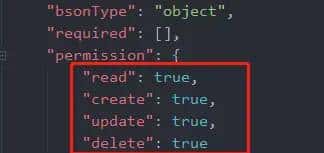
第一我们确保我们云数据库某表中的这四个权限是否已经开启,分别对应云数据库操作的增删改查的四个权限,默认这四个权限都是false,如果不开启,就不能使用云数据库提供的API。
我们目前来将云数据库中的这条记录读取到页面上。
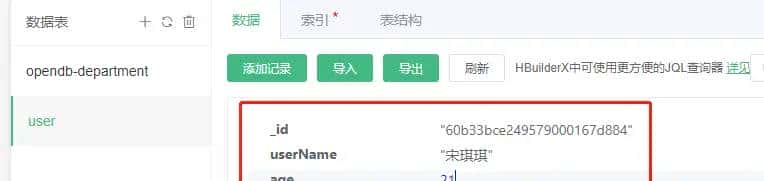
1.云数据库的读取操作get方法:
<template>
    <view class="content">
        <view>{{userInfo.userName}}</view>
        <view>{{userInfo.age}}</view>
    </view>
</template>

<script>
    export default {
        data() {
            return {
                userInfo:{}
            }
        },
        onLoad() {
            this.getMsg()
        },
        methods: {
            getMsg(){
                const db = uniCloud.database()//创建数据库连接
                db.collection("user").get()//获取数据表的信息
                .then(res => {
                    console.log(res)
                    this.userInfo = res.result.data[0]
                })
                .catch(err => {
                    console.log(err)
                })
            }
        }
    }
</script>

<style>
    .content {
        display: flex;
        flex-direction: column;
        align-items: center;
        justify-content: center;
    }

</style>
更新数据:
        onLoad() {
            this.getMsg()
        },
        methods: {
            getMsg(){
                const db = uniCloud.database()
                db.collection("user").where({_id: 60b33bce249579000167d884 }).update({
                    userName: 苏语 ,
                    age:25,
                })
                .then(res => {
                    console.log(res, 匹配成功 )
                })
                .catch(err => {
                    console.log(err)
                })
            }
        }
添加数据:
        onLoad() {
            this.getMsg()
        },
        methods: {
            getMsg(){
                let data = [
                    {
                        userName: 宋莹颖 ,
                        age:22,
                        gender: 女
                    },
                    {
                        userName: 墨泽凯 ,
                        age:20,
                        gender: 男
                    }
                ]
                const db = uniCloud.database()
                db.collection("user").add(data)
                .then(res => {
                    console.log(res, 添加数据成功 )
                    // this.userInfo = res.result.data[0]
                })
                .catch(err => {
                    console.log(err)
                })
            }

删除指定数据where+remove
        onLoad() {
            this.getMsg()
        },
        methods: {
            getMsg(){
                const db = uniCloud.database()
                db.collection("user").where({userName:"墨泽凯"}).remove()
                .then(res => {
                    console.log(res, 删除成功 )
                })
                .catch(err => {
                    console.log(err)
                })
            }
        }
过滤字段field方法
        onLoad() {
            this.getMsg()
        },
        methods: {
            getMsg(){
                const db = uniCloud.database()
                db.collection("user").field("age").get()
                .then(res => {
                    console.log(res, 匹配成功 )
                })
                .catch(err => {
                    console.log(err)
                })
            }
        }
© 版权声明
文章版权归作者所有,未经允许请勿转载。
相关文章




您必须登录才能参与评论!
立即登录






你好,请问如何读取到最新的数据呢,我现在读取到的一直都是原先的旧数据