
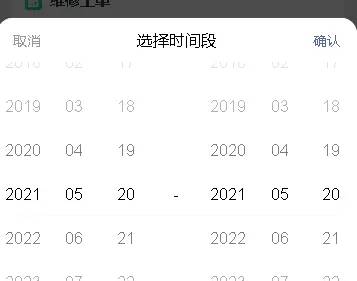
1、基于Vant UI框架实现时间段选择器
效果:
2、纯css作箭头
3、对象数组的数据的遍历展示(uniapp使用)
<template>
    <view class="formBox">
        <view class="formHeader ds">
            <view class="formHeaderData mainHeader" v-for="(keys,vals) in titleHeader" :key="vals">{{keys}}</view>
        </view>
        <scroll-view class="form" scroll-y="true">
            <view class="ds" v-for="(item,index) in tableData" :key="index">
                <view class="formMainData formHeaderData">{{index+1}}</view>
                <view class="formMainData formHeaderData" v-for="(key,val,ind) in titleHeader" :key="ind" v-if="val!== index " :class="{ oranClass : val== fsNum , blueClass : val== jaNum , greenClass : val== jaL }">{{item[val]}}</view>
            </view>
        </scroll-view>
    </view>
</template>
<script>
export default {
    name:  TableNew ,
    props: {
        titleHeader: {
            type:Object,
            default () {
                return {};
            },
        },
        tableData: {
            type:Array,
            default () {
                return [];
            },
        }
    }


}
</script>
<style lang="scss" scoped>
    .ds{
        display: flex;
        justify-content: space-between;
    }
    .form {
        width: 100%;
        height: calc(100% - 2rem);
    }
    .formBox {
        background-color: #fff;
        padding: 0.5rem;
        overflow: auto;
        width: 100%;
        height: 100%;
    }

    .formHeader {
        background-color: #FBFBFB;
        font-size: 15px;
        font-family: Source Han Sans CN;
        font-weight: bold;
        color: #A6A6A6;
        .mainHeader {
            height: 2rem;
        }
    }

    .formHeaderData {
        width: 3rem;
        font-size: 0.7rem;
        border-right: 1px solid #f0f4f8;
        border-bottom: 1px solid #f0f4f8;
        text-align: center;
        word-wrap: break-word;
        word-break: break-all;
        overflow: hidden;
        display: flex;
        justify-content: center;
        align-items: center;
    }

    .formHeaderData:nth-child(1) {
        flex: 1;
    }

    .formHeaderData:nth-child(2) {
        flex: 1;
    }

    .formMainData {
        font-size: 0.65rem;
        color: #333333;
        line-height: 2rem;
    }

    .formMainData:nth-child(1) {
        color: #999999;
    }

    .formMainData.oranClass {
        color: #F75224;
    }

    .formMainData.blueClass {
        color: #1890FF;
    }

    .formMainData.greenClass {
        color: #1ABE0E;
    }

</style>
父页面的使用
<template>
...
<tableNew :titleHeader="titleHeader" :tableData="tableData" class="contentHei"></tableNew>
...
</template>
...
    data() {
        return {
            titleHeader: {
                index:  序号 ,
                num:  大类编码 ,
                name:  大类名称 ,
                fsNum:  发生数 ,
                jaNum:  结案数 ,
                jaL:  结案率
            },
            tableData: [
                {
                    num:  S01 ,
                    name:  市容环卫 ,
                    fsNum: 1200,
                    jaNum: 1200,
                    jaL:  100%
                }
            ]
              }
    },
...
© 版权声明
文章版权归作者所有,未经允许请勿转载。
相关文章



暂无评论...