前言
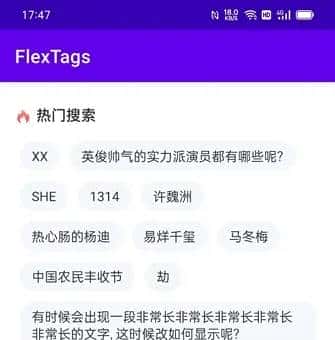
在应用中可能须要设置一些标签来方便用户去查询/搜索某些信息,比方手机助手或者购物软件之类都会有一些标签。对于软件开发者来说,如何自适应一行所占用的空间尤其关键。一般使用TextView或者Button能够有限的实现相应的效果,但是并不理想。列如不能控制换行、内容重叠等。接下来给大家带来一款兼容性强,实现灵活的Android控件:FlexTags
基础效果
使用方式
在工程根目录的build.gradle中添加
allprojects {
    repositories {
        maven { url  https://www.jitpack.io  }
        ...
    }
}
添加依赖
implementation com.github.chockqiu:FlexTags:1.1
在xml中添加布局
<com.chockqiu.libflextags.view.FlexTags
  android:id="@+id/flex_tags"
  android:layout_width="match_parent"
  android:layout_height="wrap_content"
  app:flexDirection="row"
  app:flexWrap="wrap"
  app:justifyContent="flex_start" />
设置适配器
FlexTags mFlexTags = findViewById(R.id.flex_tags);
mLayoutInflater = LayoutInflater.from(this);
FlexTags.Adapter mAdapter = new FlexTags.Adapter() {

    @Override
    public View onCreateView(ViewGroup parent) {
        return mLayoutInflater.inflate(R.layout.item_search_hot_text, parent, false);
    }

    @Override
    public void onBindView(View v, int position) {
        TextView tv = v.findViewById(R.id.tv_item_text);
        tv.setText(tags.get(position));
        tv.setOnClickListener(v1 -> Toast.makeText(mContext, tags.get(position), Toast.LENGTH_SHORT).show());
    }

    @Override
    public int getItemCount() {
        return tags.size();
    }
};
mFlexTags.setAdapter(mAdapter);
单个item布局文件: item_search_hot_text.xml
<?xml version="1.0" encoding="utf-8"?>
<TextView xmlns:android="http://schemas.android.com/apk/res/android"
    android:id="@+id/tv_item_text"
    android:layout_width="wrap_content"
    android:layout_height="wrap_content"
    android:layout_margin="6dp"
    android:background="@drawable/shape_16dp_f5f7fa"
    android:paddingStart="12dp"
    android:paddingTop="6dp"
    android:paddingEnd="12dp"
    android:paddingBottom="6dp"
    android:text="易烊千玺"
    android:textColor="#333333"
    android:textSize="14sp" />
背景shape_16dp_f5f7fa.xml
<?xml version="1.0" encoding="utf-8"?>
<shape xmlns:android="http://schemas.android.com/apk/res/android">
    <solid android:color="#F5F7FA"/>
    <corners android:radius="16dp"/>
</shape>
参考源码
https://github.com/chockqiu/FlexTags
扩展使用
- 重新设计item_search_hot_text.xml, 可以包含任意视图内容(可以是包有ImageView/TextView/Button等的组合视图)
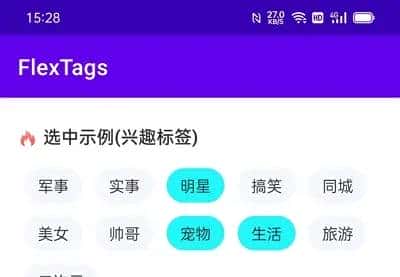
- 重写Adapter, 可以添加点击、选中或者删除逻辑;
扩展示例

© 版权声明
文章版权归作者所有,未经允许请勿转载。
相关文章

![[敛火成丹]Win11Dev-25236.1010专业工作站版-微调](https://img.niaorui.com/blogimg/20251109/ffa44c559e454254838381cf2913fcd7.jpeg)


暂无评论...