前言
摄像头设备是海康威视。在后端调用海康威视的SDK获取实时视频流,通过websocket传流并在前端通过flv.js展示。
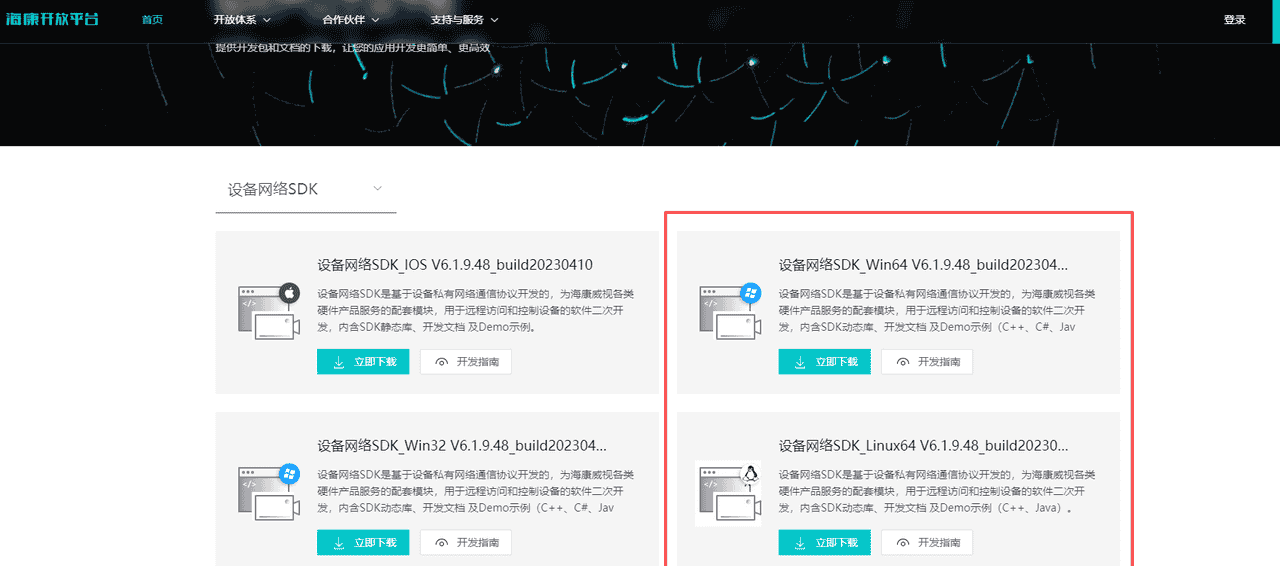
一、海康威视SDK下载
下载地址:
https://open.hikvision.com/download/5cda567cf47ae80dd41a54b3?type=10&id=5cda5902f47ae80dd41a54b7
二、引入相关包
 <!--  海康威视自带包-->
        <dependency>
            <groupId>com.sun</groupId>
            <artifactId>jna</artifactId>
            <version>3.0.9</version>
        </dependency>
        <dependency>
            <groupId>com.sun.jna</groupId>
            <artifactId>examples</artifactId>
            <version>1.0.0</version>
        </dependency>
		 <!--  视频流转码相关包-->
        <dependency>
            <groupId>org.bytedeco</groupId>
            <artifactId>javacv</artifactId>
            <version>1.5.3</version>
        </dependency>
        <dependency>
            <groupId>org.bytedeco</groupId>
            <artifactId>ffmpeg-platform</artifactId>
            <version>4.2.2-1.5.3</version>
        </dependency>
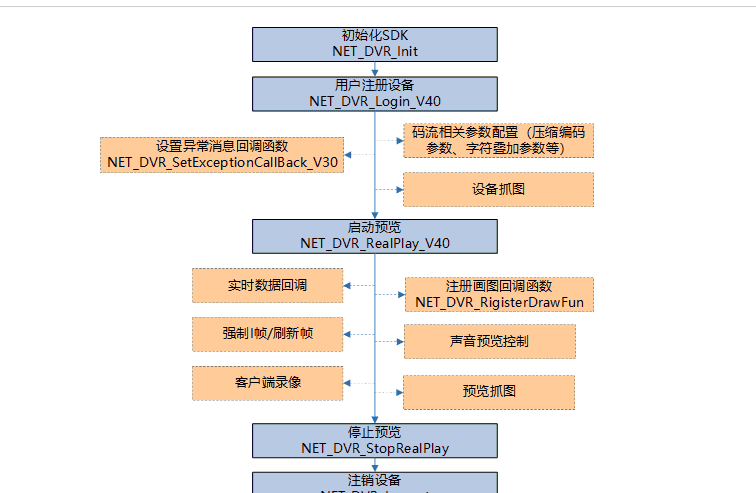
实时视频流调用流程
int iErr = 0;
    static HCNetSDK hCNetSDK = null;
    static PlayCtrl playControl = null;
    static int lUserID = -1;//用户句柄
    static int lDChannel;  //预览通道号
    static int lPlayHandle = -1;  //预览句柄
    static boolean bSaveHandle = false;
    Timer Playbacktimer;//回放用定时器
    static FExceptionCallBack_Imp fExceptionCallBack;
    static int FlowHandle;
    static class FExceptionCallBack_Imp implements HCNetSDK.FExceptionCallBack {
        public void invoke(int dwType, int lUserID, int lHandle, Pointer pUser) {
            System.out.println("异常事件类型:"+dwType);
            return;
        }
    }

    /**
     * 动态库加载
     *
     * @return
     */
    public static boolean createSDKInstance() {
        if (hCNetSDK == null) {
            synchronized (HCNetSDK.class) {
                String strDllPath = "";
                try {
                    if (osSelect.isWindows())
                        //win系统加载库路径
                        strDllPath = System.getProperty("user.dir") + "\src\main\resources\lib\HCNetSDK.dll";

                    else if (osSelect.isLinux())
                        //Linux系统加载库路径
                        strDllPath = System.getProperty("user.dir") + "/src/main/resources/lib/libhcnetsdk.so";
                    hCNetSDK = (HCNetSDK) Native.loadLibrary(strDllPath, HCNetSDK.class);
                } catch (Exception ex) {
                    System.out.println("loadLibrary: " + strDllPath + " Error: " + ex.getMessage());
                    return false;
                }
            }
        }
        return true;
    }
登录设备
/**
     * 登录设备
     * @param ip
     * @param port
     * @param userName
     * @param password
     * @return
     */
    public static int loginDevice(String ip, int port, String userName, String password) {
        HKClientUtil.createSDKInstance();
        HCNetSDK sdk = hCNetSDK;
        sdk.NET_DVR_Init();

        // 设备信息
        HCNetSDK.NET_DVR_DEVICEINFO_V30 devinfo = new HCNetSDK.NET_DVR_DEVICEINFO_V30();
        int user = sdk.NET_DVR_Login_V30(ip, (short) port, userName, password, devinfo);

        if (user == -1){
            throw new BaseException("设备登录失败");
        }
        return user;
    }
取流
public static fRealPlayEScallback fRealPlayescallback; //裸码流回调函数
/**
     * @param userID     设备登录句柄
     * @param iChannelNo 通道号
     * @return 取流预览句柄
     */
    public static int getRealStreamData(String carmeraId,int userID, int iChannelNo) {
        if (userID == -1) {
            System.out.println("请先注册");
            return -1;
        }
        HCNetSDK.NET_DVR_PREVIEWINFO previewInfo = new HCNetSDK.NET_DVR_PREVIEWINFO();
        previewInfo.read();
        previewInfo.hPlayWnd = 0;  //窗口句柄,从回调取流不显示一般设置为空
        previewInfo.lChannel = iChannelNo;  //通道号
        previewInfo.dwStreamType = 1; //0-主码流,1-子码流,2-三码流,3-虚拟码流,以此类推
        previewInfo.dwLinkMode = 0; //连接方式:0- TCP方式,1- UDP方式,2- 多播方式,3- RTP方式,4- RTP/RTSP,5- RTP/HTTP,6- HRUDP(可靠传输) ,7- RTSP/HTTPS,8- NPQ
        previewInfo.bBlocked = 1;  //0- 非阻塞取流,1- 阻塞取流
        previewInfo.byProtoType = 0; //应用层取流协议:0- 私有协议,1- RTSP协议
        previewInfo.byPreviewMode = 0;
        previewInfo.write();
        //回调函数定义必须是全局的
        if (fRealDataCallBack == null) {
            fRealDataCallBack = new FRealDataCallBack();
        }
        Pointer aNull = Pointer.NULL;
        Pointer pointer = aNull.createConstant(userID);
        //开启预览
        int Handle = hCNetSDK.NET_DVR_RealPlay_V40(userID, previewInfo, null, null);
        if (Handle == -1) {
            int iErr = hCNetSDK.NET_DVR_GetLastError();
            System.err.println("取流失败" + iErr);
            return -1;
        }
        if (fRealPlayescallback==null)
        {
            fRealPlayescallback = new fRealPlayEScallback(carmeraId);
        }
        boolean b = hCNetSDK.NET_DVR_SetESRealPlayCallBack(Handle, fRealPlayescallback, pointer);
        if (!b){
            System.out.println(hCNetSDK.NET_DVR_GetLastError());
        }

        System.out.println("取流成功");
        return Handle;
    }

/**
     * 停止实时播放
     * 传入播放句柄
     * @param PlayHandle
     */
    public static void stopRealPlay(int PlayHandle){
        hCNetSDK.NET_DVR_StopRealPlay(PlayHandle);
    }
/**
*预览回调
**/
static class fRealPlayEScallback implements  HCNetSDK.FPlayESCallBack {
        private String cameraId;//预览的时候传入对应的设备id,唯一值
        public fRealPlayEScallback(String cameraId) {
            this.cameraId = cameraId;
        }
        private final ByteArrayOutputStream outputStream = new ByteArrayOutputStream();
        public void invoke(int lPreviewHandle, HCNetSDK.NET_DVR_PACKET_INFO_EX pstruPackInfo, Pointer pUser) {
            pstruPackInfo.read();
            //将设备发送过来的回放码流数据写入文件
            //保存I帧和P帧数据
            if (pstruPackInfo.dwPacketType == 1 || pstruPackInfo.dwPacketType == 3)
            {
                if (pstruPackInfo.dwPacketType == 1) {
                    byte[] byteArray = outputStream.toByteArray();
                    outputStream.reset();
                    if (byteArray.length > 0) {
                        // 通过websocket发送
                        long start = System.currentTimeMillis();
                        VideoWebSocket socket = Sc.getBean(VideoWebSocket.class);
                        socket.sendMessageToOne(cameraId, byteArray);
                    }
                }
                long offset = 0;
                ByteBuffer buffers = pstruPackInfo.pPacketBuffer.getByteBuffer(offset, pstruPackInfo.dwPacketSize);
                byte[] bytes = new byte[pstruPackInfo.dwPacketSize];
                buffers.rewind();
                buffers.get(bytes);
                try {
                    outputStream.write(bytes);
//                    EstremDataoutputStream.write(bytes);
                } catch (IOException e) {
                    e.printStackTrace();
                }
                return;
            }

        }
    }
取流成功记得存储预览句柄
public static Map<String,Integer> videoMap = new ConcurrentHashMap<>();
public Map<String,String> playRealDevice(String id){
        Map<String,String> map = new HashMap<>();
        int userId = VideoUtil.loginDevice("", "", "", "");
        int playHandle = VideoUtil.getRealStreamData(id,userId, data.getChannelNo().intValue());
        map.put("userId", userId+"");
        map.put("playHandle", playHandle+"");
        videoMap.put(id, playHandle);
        return map;
    }
websocket配置类
/**
 * @description websocket实现类
 */
@ServerEndpoint("/video/{uid}")
@Component
public class VideoWebSocket {
    private static Log log = LogFactory.get(VideoWebSocket.class);
//    private FileOutputStream outputStream;
    private static FFmpegFrameRecorder recorder;
    private static ByteArrayOutputStream outputStream;
    private static boolean initialized = false;

    /**
     * 静态变量,用来记录当前在线连接数。应该把它设计成线程安全
     */
    private final AtomicInteger onlineCount = new AtomicInteger(0);
    /**
     * 存放每个客户端对应的WebSocket对象,根据设备uid建立session
     */
    public static ConcurrentHashMap<String, Session> sessions = new ConcurrentHashMap<>();
    /**
     * 存放客户端的对象
     *//*
    public static CopyOnWriteArrayList<Session> sessionList=new CopyOnWriteArrayList<>();*/

    /**
     * 有websocket client连接
     *
     * @param uid 预览句柄
     * @param session
     */
    @OnOpen
    public void OnOpen(@PathParam("uid") String uid, Session session) {

        if (sessions.containsKey(uid)) {
            sessions.put(uid, session);
        } else {
            addOnlineCount();
            sessions.put(uid, session);
        }
        outputStream = new ByteArrayOutputStream();
        recorder = new FFmpegFrameRecorder(outputStream, 0);
        initialized = false;
        log.info("websocket connect.session: " + session);
    }

    /**
     * 连接关闭调用的方法
     *
     * @param uid 预览句柄
     * @param session         websocket连接对象
     */
    @OnClose
    public void onClose(@PathParam("uid") String uid, Session session) {
        IvWharfVideoService ivWharfVideoService = Sc.getBean(IvWharfVideoService.class);
        log.info("websocket close.session: " + uid);
        if (sessions.containsKey(uid)) {
            sessions.remove(uid);
            subOnlineCount();
            ivWharfVideoService.stopRealPlayMap(uid);
        }
    }

    /**
     * 发生错误
     *
     * @param throwable e
     */
    @OnError
    public void onError(Throwable throwable) {
        throwable.printStackTrace();
    }

    /**
     * 收到客户端发来消息
     *
     * @param message 消息对象
     */
    @OnMessage
    public void onMessage(ByteBuffer message) {
        log.info("服务端收到客户端发来的消息: {}", message);
    }

    /**
     * 收到客户端发来消息
     *
     * @param message 字符串类型消息
     */
    @OnMessage
    public void onMessage(String message) {
        log.info("服务端收到客户端发来的消息: {}", message);
    }

    /**
     * 发送消息
     *
     * @param message 字符串类型的消息
     */
    public void sendAll(String message) {
        for (Map.Entry<String, Session> session : sessions.entrySet()) {
            session.getValue().getAsyncRemote().sendText(message);
        }
    }

    /**
     * 发送binary消息
     *
     * @param buffer
     */
    public void sendMessage(ByteBuffer buffer) {
        for (Map.Entry<String, Session> session : sessions.entrySet()) {
            session.getValue().getAsyncRemote().sendBinary(buffer);
        }
    }

    /**
     * 发送binary消息给指定客户端
     *
     * @param uid 预览句柄
     */
    public void sendMessageToOne(String uid, byte[] byteArray) {
        // 使用ByteArrayInputStream作为输入流
        ByteArrayInputStream inputStream = new ByteArrayInputStream(byteArray);

        try {
            // 创建FFmpegFrameGrabber
            FFmpegFrameGrabber grabber = new FFmpegFrameGrabber(inputStream);
            grabber.setFormat("h264");
            grabber.start();
            if (outputStream == null){
                outputStream = new ByteArrayOutputStream();
                recorder = new FFmpegFrameRecorder(outputStream, 0);
            }

            if (!initialized) {
                initialized = true;
                recorder = new FFmpegFrameRecorder(outputStream, 0);
                recorder.setVideoCodec(grabber.getVideoCodec());
                recorder.setFormat("flv");
                recorder.setFrameRate(grabber.getFrameRate());
                recorder.setGopSize((int) (grabber.getFrameRate() * 2));
                recorder.setVideoBitrate(grabber.getVideoBitrate());
                recorder.setImageWidth(grabber.getImageWidth());
                recorder.setImageHeight(grabber.getImageHeight());
                recorder.start();
            }

            Frame frame;
            while ((frame = grabber.grab()) != null) {
                recorder.record(frame);
            }

            grabber.stop();
            grabber.release();

            byte[] flvData = outputStream.toByteArray();
            outputStream.reset();
            Session session = sessions.get(uid);
            if (session != null) {
                synchronized (session) {
                    session.getBasicRemote().sendBinary(ByteBuffer.wrap(flvData));
                }
            } else {
                //log.error("session is null.please check.", this);
            }
        } catch (Exception e) {
            initialized = false;
//            e.printStackTrace();
        }
    }

    public void sendMessageToAll(ByteBuffer buffer) {

        for (Session session : sessions.values()) {
            synchronized (session) {
                try {
                    /**
                     * tomcat的原因,使用session.getAsyncRemote()会报Writing FULL WAITING error
                     * 需要使用session.getBasicRemote()
                     */
                    session.getBasicRemote().sendBinary(buffer);
                } catch (Exception e) {
                    e.printStackTrace();
                }
            }
        }
    }

    /**
     * 主动关闭websocket连接
     *
     * @param uid 预览句柄
     */
    public void closeSession(String uid) {
        try {
            Session session = sessions.get(uid);
            if (session != null) {
                session.close();
            }
        } catch (IOException e) {
            e.printStackTrace();
        }
    }

    /**
     * 获取当前连接数
     *
     * @return
     */
    public int getOnlineCount() {
        return onlineCount.get();
    }

    /**
     * 增加当前连接数
     *
     * @return
     */
    public int addOnlineCount() {
        return onlineCount.getAndIncrement();
    }

    /**
     * 减少当前连接数
     *
     * @return
     */
    public int subOnlineCount() {
        return onlineCount.getAndDecrement();
    }
}
以上是后端的相关实现,通过javacv对海康威视实时视频流转码,并通过websocket传给前端。
因为非测试项目,没有完整代码,只有部分核心代码。
三、前端
使用flv.js接收websocket的视频流展示
部分代码展示
<template>
  		<div class="player-wrap">
           <video ref="player1" :autoplay="autoplay" loop muted></video>
        </div>

</template>
<script setup>
import {onMounted, reactive, ref, nextTick, onUnmounted} from "vue";
import {onBeforeRouteLeave} from "vue-router";
import flvjs from "flv.js";
onMounted(() => {

})
onUnmounted(() => {
  destroyAll();
  stopRealPlay()

})

const player1 = ref();
const flvPlayer1 = ref();
function playDevice(item, player){
  initPlayer(item,player);
}


/**
 * 销毁实时视频
 */
function stopRealPlay(){
  if (playHandleArray.value.length > 0){
    for (var i of playObject.value){
      if (i.isPlay){

      }
    }
  }
}

onBeforeRouteLeave((to, from, next) => {
  // destroy();
  destroyAll()
  stopRealPlay()
  next();
})


const destroy = () => {
 if (flvPlayer1.value) {
        flvPlayer1.value.pause();
        flvPlayer1.value.unload();
        flvPlayer1.value.detachMediaElement();
        flvPlayer1.value.destroy();
        flvPlayer1.value = null;
      }
};
const destroyAll = () => {
  if (flvPlayer1.value) {
    flvPlayer1.value.pause();
    flvPlayer1.value.unload();
    flvPlayer1.value.detachMediaElement();
    flvPlayer1.value.destroy();
    flvPlayer1.value = null;
  }
};

const initPlayer = (item,player) => {
  if (flvjs.isSupported()) {
    let url = window.server.wsURL + "/video/" + item
   const videoElement = player1.value;
      flvPlayer1.value = flvjs.createPlayer({
        type: "flv",
        url: url,
        isLive: true,
        hasAudio: false,
        enableStashBuffer: true,
        // cors: true
      }, {
        enableStashBuffer: false,
        stashInitialSize: 128,
      });
      flvPlayer1.value.attachMediaElement(videoElement);
      flvPlayer1.value.load();
      nextTick(() => {
        flvPlayer1.value.play();
        flvPlayer1.value.playbackRate = 1;
      });
      flvPlayer1.value.on(flvjs.Events.ERROR, (e, errorData) => {
        console.error("视频播放错误", e, errorData);
        // 处理错误,比如弹窗提示用户
      });
  } else {
    console.error("浏览器不支持flv播放");
  }
};


</script>
<style scoped lang="less">
.player-wrap {
  position: relative;
  width: 100%;
  height: 100%;
  border-radius: 4px;
  .video {
    width: 100%;
    height: 100% !important;
    background: transparent !important;
    padding-top: 0 !important;
    border-radius: 4px;
  }
  :deep(video) {
    width: 100%;
    height: 100%;
    border-radius: 4px;
    object-fit: cover;
  }
}
</style>
© 版权声明
文章版权归作者所有,未经允许请勿转载。
相关文章
没有相关内容!

暂无评论...